In short
Almost every MOSS-Image failure in ComfyUI traces to one of four things: a ComfyUI older than v0.42.0 (no moss_image CLIP type, Could not detect model type), the wrong shift node, the --use-sage-attention launch flag, or mixing the plugin and native file sets. Check the version first, then match your message in the table below.
If MOSS-Image will not load in your ComfyUI, the cause is almost always the version number, not your files. Native support was merged on 16 October 2026, the first tagged release that carries it is v0.42.0 from 18 October, and a character workflow that worked on the day before still fails on 0.41.3 with the same message that sends people down the wrong path.
This guide matches the messages people actually posted to a fix, in the order that costs least time. Everything about versions and settings is checked against Comfy's documentation, the release page and the OpenMOSS repository. What creators reported is attributed to the Hugging Face threads where it was posted, and the places where those threads never reached an answer are marked.
Check the version before anything else
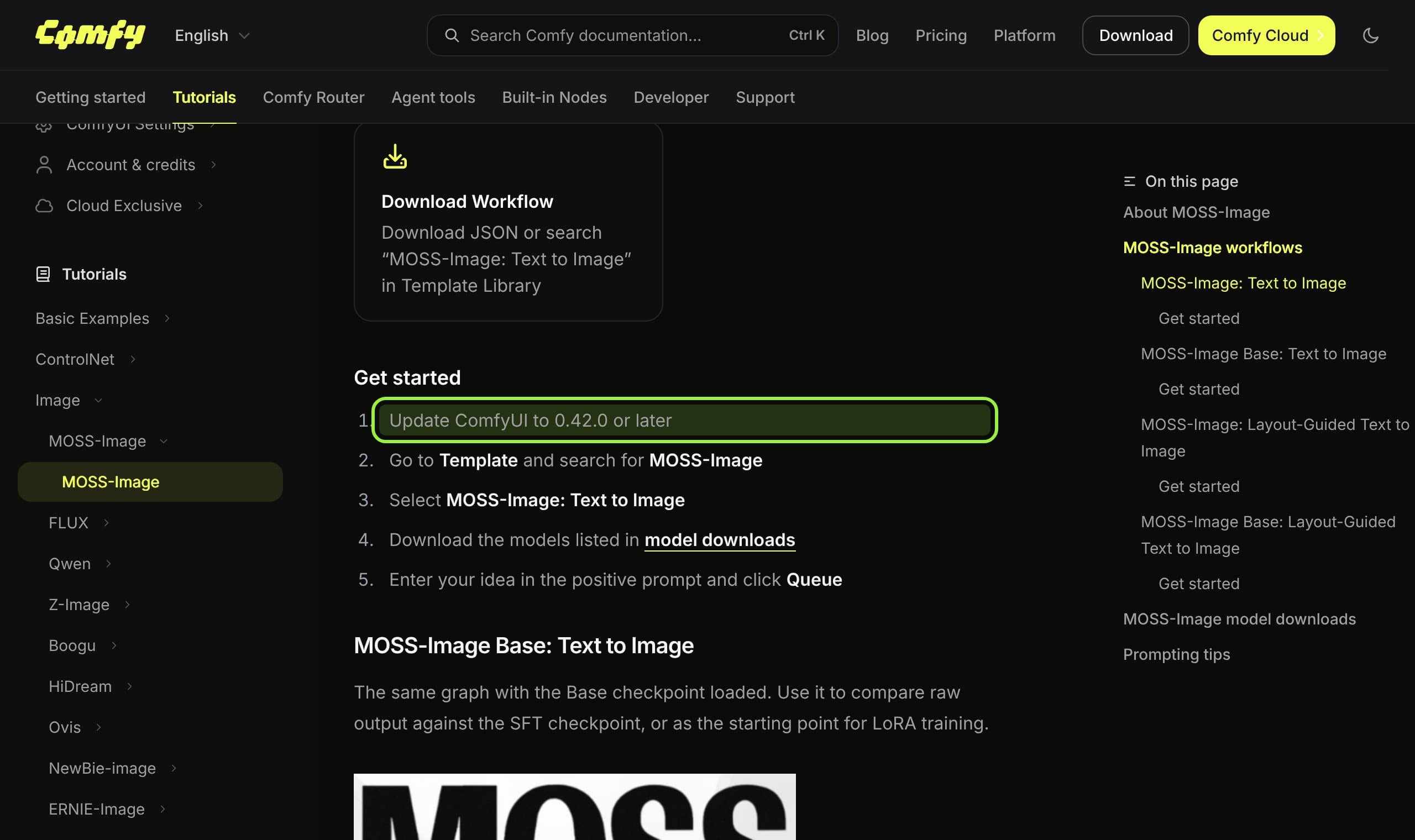
Comfy's MOSS-Image tutorial opens its setup with one instruction: update ComfyUI to 0.42.0 or later. The release page for v0.42.0, published on 18 October, lists the support (pull request 17095, by kijai) and a follow-up that uses fused attention with the model. The docs changelog adds layout prompts the same day and a color and depth control entry on 20 October, listed under v0.42.2.
The trap is that the stable and nightly lines moved at different times. In the model repack's discussions a user on stable 0.41.3 got the load error, and a commenter reported that the moss-image CLIP type had been available only on nightly the night before and worked on stable the next morning. That is a timing report, not a rule, so read your own version in the ComfyUI log at startup rather than trusting the channel name.
Match your message to the fix
| What you see | Cause | Fix |
|---|---|---|
moss_image missing from the Load CLIP type list, or an invalid input error on that dropdown | ComfyUI older than 0.42.0 | Update to 0.42.0 or newer, then reload the page so the node refreshes |
RuntimeError: ERROR: Could not detect model type of: ...moss_image_base_int8_convrot.safetensors on the Load Diffusion Model node | Same old build; it cannot recognise the architecture | Update first. One reporter's other int8 file loaded fine, so if the update does not help, redownload from the repack |
| Dtype error at the KSampler, gone when the shift node is removed | The wrong shift node, ModelSamplingSD3 | Use ModelSamplingAuraFlow or ModelSamplingFlux, which a maintainer said share the same scale |
| Washed-out colors and curly artifacts | --use-sage-attention in the launch flags | Remove the flag and restart |
| Missing node errors when opening an official OpenMOSS workflow | That workflow expects the OpenMOSS plugin | Install the plugin, or open the native template from Comfy's template library instead |
| Out of memory on a 12 GB card | bf16 weights or a large text encoder | Load the int8 diffusion model and the W4A8 text encoder from the repack, 1 MP resolution |
The fix order that works
- 1
Read the ComfyUI version in the startup log
You want 0.42.0 or newer. If you are on 0.41.x, update before you touch a single file.
- 2
Use the native template, not a mixed file set
The docs list four files: the SFT or Base int8 diffusion model, the W4A8 Qwen3.5 9B text encoder and the small FLUX.2 VAE, in
diffusion_models,text_encodersandvae. A Kijai reply in the repack thread says no extra nodes are needed; the models are meant for core nodes. The OpenMOSS repository says the same about its own plugin, which stays useful for local Diffusers folders. - 3
Set the CLIP type to `moss_image`
Load the text encoder with the Load CLIP node set to that type. Reports of people substituting the Flux 2 type to get past the dropdown exist, but they are workarounds for an old build, not the supported route.
- 4
Fix the shift node
If you copied a graph from another model, check for ModelSamplingSD3 and swap it for AuraFlow or Flux sampling. The vendor baseline in the repository is shift 5; Comfy's template page does not state one.
- 5
Drop speed flags, then retest
Remove
--use-sage-attention. Add flags back one at a time so a regression points at one change. - 6
Compare against Comfy's template settings
The template runs 25 steps, CFG 2.5 and the er_sde sampler for speed. The docs say to try the official 50 steps and CFG 3 if results look undercooked, and sizes must be multiples of 16.
Stop at the first step that lets the graph finish.
What creators are saying
What creators are saying
A user on stable 0.41.3 hit the Could not detect model type error on the Base int8 file and found the CLIP type missing; the replies pointed at the build, not the file.
ComplaintComfy-Org/MOSS-Image discussions, int8 failure thread
Another reporter had the same problem with one int8 quant, while a different convrot int8 release loaded fine, which is why a corrupt or odd download is worth testing second.
A Windows 11 RTX 3090 user saw desaturated images with weird curls and fixed them by removing the sage attention launch flag.
One person asked whether the official workflow really needs denoise 1.0 and whether skip layer should run 0 to 1 or 0 to 0.5. The thread shows no answer to either.
QuestionComfy-Org/MOSS-Image discussions, simple workflow thread
What this does not fix
Updating gets the model to run. It does not give it your character. The released model takes no reference image, as our MOSS-Image review lays out, so a recurring face still needs a LoRA, and the best LoRA training tools are the next stop. If you were choosing between models rather than debugging one, the three-way comparison covers licenses and reference support.
If the message that remains is a missing node rather than a model problem, the missing nodes guide is the general routine. If your errors are memory crashes with free VRAM, that is a different family, covered in the Dynamic VRAM fix. A card too small for the stack is a case for the rent-a-GPU page before a purchase.
MOSS-Image setup cheat sheet
- ComfyUI
- 0.42.0 or newer (Comfy docs)
- Diffusion model
- moss_image_sft_int8_convrot or moss_image_base_int8_convrot, in diffusion_models
- Text encoder
- qwen3.5_9b_w4a8_gptq, in text_encoders, Load CLIP type moss_image
- VAE
- flux2-vae_small, in vae
- Shift node
- ModelSamplingAuraFlow or ModelSamplingFlux, never SD3
- Template sampling
- 25 steps, CFG 2.5, er_sde; try 50 steps and CFG 3 if undercooked
- Size
- Multiples of 16, 1 MP default, trained for 1 to 2 MP
- Avoid
- --use-sage-attention until you know it is not the cause
Verdict
Do not reinstall models or hunt for a hidden node. Look at the version, fix the shift node and take out one launch flag. Those three steps account for every reproducible failure in the threads, and each is documented by Comfy or the model's maintainers. What remains unproven is how stable and nightly differ on a given day, because the threads only carry relative timestamps.
Musetta runs on your own ComfyUI and installs the nodes and models a workflow is missing, so a version or file mismatch shows up before a run rather than in the middle of one. It does not change which ComfyUI build you run, and it cannot fix a model that your build does not support. See how it compares with working in ComfyUI directly.
Questions
- Why is moss_image missing from my Load CLIP type list?
- Your ComfyUI is older than 0.42.0. Comfy's tutorial says to update to 0.42.0 or later, and the support was merged on 16 October 2026 and released on 18 October.
- What does Could not detect model type of moss_image mean?
- The loader does not recognise the architecture, which the thread reporters tied to an outdated ComfyUI. Update before replacing the file.
- Which node sets shift for MOSS-Image?
- A maintainer said to use ModelSamplingAuraFlow or ModelSamplingFlux, because ModelSamplingSD3 was the wrong node and caused a dtype error.
- Why are my MOSS-Image pictures washed out?
- One Windows user fixed desaturated, curly output by removing the --use-sage-attention launch flag. It is one report, so test it by removing the flag.
- Do I need the OpenMOSS plugin?
- No for the native workflow. Comfy's template and the OpenMOSS repository both say the built-in loaders work with the Comfy-Org files.
Sources
- 01MOSS-Image tutorial · Comfy docs, 2026-10
- 02ComfyUI changelog · Comfy docs, 2026-10-20
- 03ComfyUI v0.42.0 release · GitHub, Comfy-Org, 2026-10-18
- 04feat: Add MOSS-image support, pull request 17095 · GitHub, Comfy-Org, 2026-10-16
- 05Comfy-Org/MOSS-Image repack · Hugging Face, 2026-10
- 06int8 failure discussion · Hugging Face, 2026-10
- 07Simple workflow discussion · Hugging Face, 2026-10
- 08OpenMOSS/MOSS-Image repository · GitHub, OpenMOSS, 2026-10
Researched and written by the Musetta editorial desk with AI assistance, from the sources above. Numbers come from those sources; nothing is benchmarked by us unless the article says so. Spotted an error? Tell us on Discord and we fix it.