In short
Since March 2026 ComfyUI loads models through Dynamic VRAM on Nvidia, and it can raise a generic out-of-memory error while VRAM is free. Read the exact error text, then launch once with --disable-dynamic-vram to see whether the loader or the card is at fault. As of 14 October three related issues are still open, --lowvram does nothing while Dynamic VRAM is on, and one MiniMax H3 crash was fixed by pinning comfy-kitchen 0.2.30.
If your character reel dies at 80% with CUDA error: out of memory while Task Manager shows free VRAM, the card is probably not the problem. Since March 2026 ComfyUI has loaded models through Dynamic VRAM, and on 14 October 2026 the three most-reported crashes under it are still open on the tracker.
This guide is the order that costs the least time: read the error string, run one diagnostic launch flag, pin one package if the string says so, and only then decide you need a bigger GPU. Every flag and version below is checked against Comfy's own documentation or issue pages, and anything I could only read in a third-party guide is labelled as such.
Why free VRAM and an out-of-memory error can both be true
The old loader estimated how much memory a model needed and reserved it up front. Dynamic VRAM, announced by the maintainer on 1 March 2026, copies the parts of a model the GPU needs at the moment it needs them, so a model can be larger than your VRAM or your RAM. The stated goals were less RAM use, faster first loads and LoRA changes, and fewer out-of-memory stops.
It is on automatically on Nvidia GPUs under Windows and Linux. Comfy's startup flags page lists it as automatic on Nvidia and on ROCm 7.14 or newer, and the maintainer said in the announcement that WSL may never be supported. That is why a card with 12 GB can run a 33B-parameter video model at all, as covered in the MiniMax H3 review.
The cost is a new failure surface. Streaming weights through pinned host memory, reading them from disk and mapping them into the GPU can fail in places the old loader never went, and those failures often surface as a generic out-of-memory message. The announcement thread also warned that higher VRAM use is normal and that Task Manager may not show lower RAM, because weights stay cached in RAM.
Read the error string first
Different crashes have different first moves. Match the exact text in your console, not the symptom. The table pairs each string with the issue where it is tracked and what reporters or maintainers tried first.
| What the console says | Where it is tracked | First move |
|---|---|---|
HostBuffer.read_file_slice failed, then CUDA error: out of memory | Issue 15255, opened 3 August, open, assigned to a maintainer | --disable-dynamic-vram; on two GPUs, --cuda-device 0 or --disable-pinned-memory |
HostBuffer.truncate failed with an illegal memory access was encountered | Issue 15591, opened 13 August, open | pip install comfy-kitchen==0.2.30, then restart (reporter's fix) |
VRAM Allocation failed (non OOM) or Fault failed: 2 on the second queued run | Issue 15269, opened 3 August, open | --disable-dynamic-vram, or an older ComfyUI build (reported) |
Plain Allocation on device with free VRAM and no HostBuffer line | Not a ComfyUI string; PyTorch's allocator message | --vram-headroom 2 first (a third-party guide's suggestion), then --disable-dynamic-vram |
| Slow loads after the update, models stored on a hard disk | Announcement thread | --disable-dynamic-vram, or move models to an SSD |
The fix order that works, one change at a time
Change one thing per launch. A troubleshooting guide that tracks these reports makes the same point: if two flags change together, a success teaches you nothing.
- 1
Update and note your versions
Run
python main.py --helpto confirm which flags your build knows, and note the ComfyUI version and your GPU. v0.39.0 (5 October) includes a MiniMax video decoder offload fix and v0.40.0 (13 October) an updated memory library, so an old install may already be fixed. Neither release notes mention Dynamic VRAM by name. - 2
Run the same workflow with `--disable-dynamic-vram`
Per Comfy's docs this turns Dynamic VRAM off and falls back to estimate-based model loading. If the identical workflow now finishes, your VRAM was enough and the loader was the problem. Treat it as a diagnostic first and a permanent setting second, because it can be slower.
- 3
Match `HostBuffer.truncate failed` to the package pin
If the console shows that string with an illegal memory access, check your
comfy-kitchenversion. The reporter of issue 15591 finished the same 73-frame MiniMax H3 job afterpip install comfy-kitchen==0.2.30. A comment on 30 September says the bug persisted on 0.2.35, so a pin is a diagnostic, not a promise. - 4
On two GPUs, hide one
--cuda-device 0restricts ComfyUI to the first card. Maintainers gave this and--disable-pinned-memoryas the workarounds in issue 15255. A later commenter there attributed the multi-GPU part to a driver bug. - 5
Rule out custom nodes
Launch with
--disable-all-custom-nodes. If the error vanishes, re-enable packs in halves until it returns. The announcement thread reports nodes that broke on the new loader, including TensorRT nodes and loaders with a changed function signature. - 6
Only then ask whether the card is too small
Run
nvidia-smi -l 1during the failing step. If memory climbs to the ceiling and a shorter clip or lower resolution reliably moves the failure point, you have a real capacity limit.
Stop at the first step that lets the workflow finish, and write down which one it was.
Flags that no longer do what old guides say
Most advice on the web was written before March. Two flags are the usual traps.
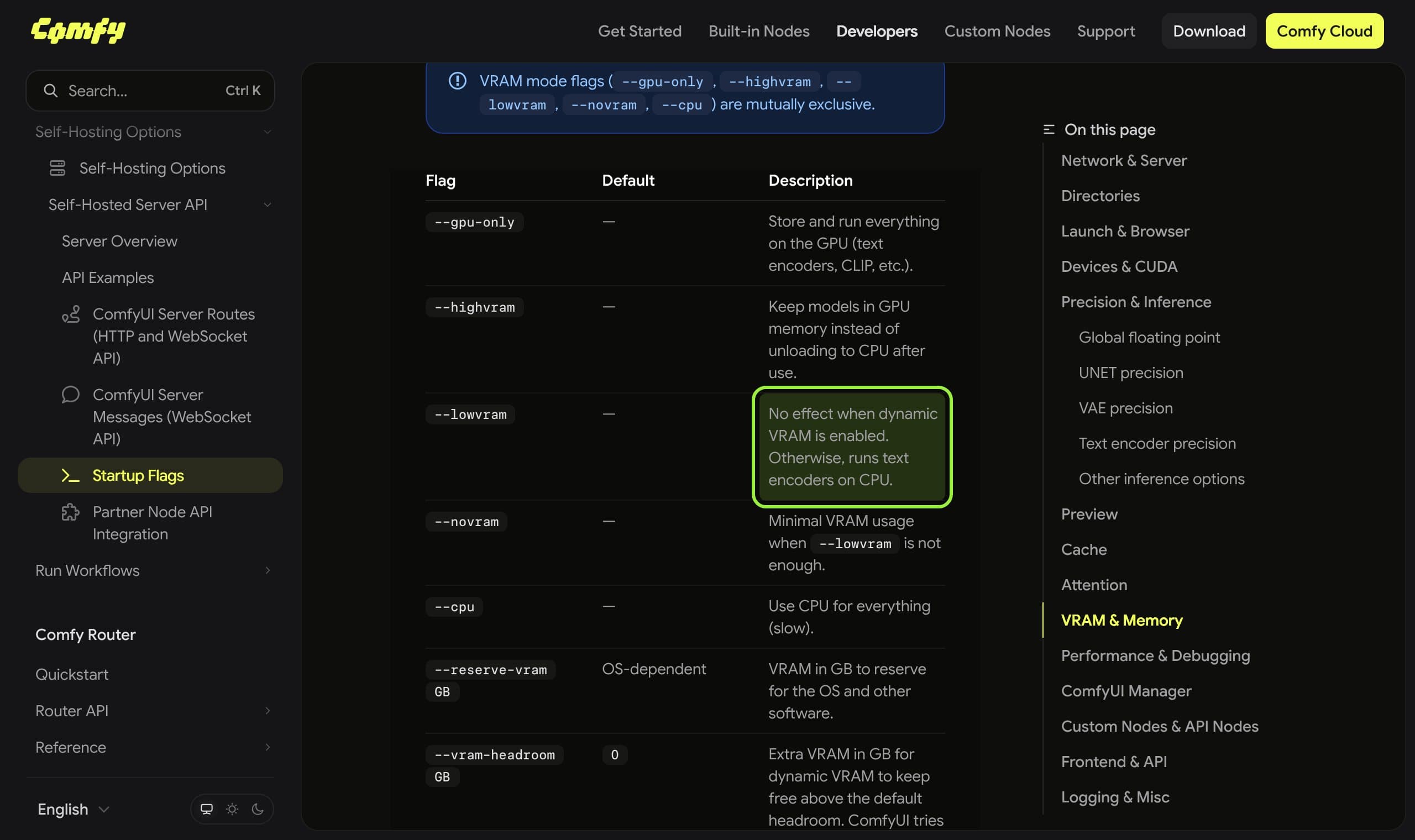
Memory flags, as Comfy documents them
- `--lowvram`
- No effect when dynamic VRAM is enabled; otherwise runs text encoders on CPU
- `--disable-dynamic-vram`
- Turns it off and uses estimate-based model loading
- `--vram-headroom GB`
- Default 0; extra VRAM kept free above the default headroom for dynamic VRAM
- `--reserve-vram GB`
- VRAM reserved for the OS and other software; default depends on the OS
- `--disable-pinned-memory`
- Disables pinned memory use
- `--disable-smart-memory`
- Offloads to RAM aggressively instead of keeping models in VRAM
- `--cache-none`
- Uses less RAM and VRAM but re-executes every node on each run
One more trap, from the troubleshooting guide above: --normalvram is no longer a valid argument and can crash the desktop app. And do not stack --disable-smart-memory, --reserve-vram and --cache-none hoping one helps; the guide advises against combining them, and you will not learn which one mattered.
What is still broken on 14 October 2026
A fix you can trust needs a merged change, and these are not there yet. Nothing below is a prediction; it is what the pages said when I read them.
1 March 2026
Dynamic VRAM announced as enabled by default for Nvidia on Windows and Linux.
3 August 2026
Issue 15255 (HostBuffer.read_file_slice, then CUDA out of memory) and issue 15269 (second generation fails, first reported on a Qwen-Image workflow) are opened. Both are still open.
13 August 2026
Issue 15591 opened: HostBuffer.truncate failure on a 12 GB RTX 3080 Ti running MiniMax H3, fixed for the reporter by the 0.2.30 pin.
30 September 2026
A commenter on issue 15591 reports the same crash on comfy-kitchen 0.2.35.
8 October 2026
A commenter on issue 15255 proposes a patch for a cleanup masking bug and says the multi-GPU part was a driver problem. The issue stays open.
13 October 2026
ComfyUI v0.40.0 ships an updated memory library and a Qwen 2.1 low-VRAM fix.
What creators are saying
Some people report that launching with the disable flag cured their out-of-memory errors completely, while others say it did not fully fix their issues, including one on a 24 GB card.
One user saw out-of-memory errors that only stopped after removing the reserve-VRAM launch option from their start script.
ComplaintComfyUI GitHub discussion 12699
Models stored on a hard disk loaded very slowly after Dynamic VRAM became the default, and users asked for a way to switch it off in the desktop app.
ComplaintComfyUI GitHub discussion 12699
The first run succeeds, the second queued run fails before sampling starts, and pressing Run by hand after each failure works.
ComplaintComfyUI GitHub issue 15269
Downgrading comfy-kitchen to 0.2.30 let the same 73-frame MiniMax H3 workflow finish on a 12 GB card; a later comment says 0.2.35 still crashes.
The pattern: Comfy's maintainers are working on it, none of these three issues has a fix you can install today, and the disable flag is the one workaround reporters agree on, with the caveat that it does not rescue everyone.
When it really is the card
Sometimes the answer is capacity. A 33B video model on a 12 GB card runs on offloading and goodwill, and long clips can fail at the decode step. Shorten the clip, lower the resolution, or drop the batch to one before you buy anything. If a smaller job reliably moves the failure point and nvidia-smi shows memory pinned at the ceiling, rent a bigger GPU for the long renders instead of fighting the loader. Our Wan 2.2 guide and the open video model ranking say which models are kind to small cards.
If ComfyUI will not start or connect after a flag change, a mistyped flag is the usual cause; the connection help page walks the checks, and a missing node pack after pruning custom nodes is covered in the missing nodes guide.
Keep a character feed running while you debug
The expensive part of an OOM crash for a creator is not the minute lost, it is the reel that dies at the last frame and the reference photos you re-upload to retry. Musetta runs on your own ComfyUI, so these launch flags are yours to set, and it keeps your characters' reference sets in one place so a retry after a flag change is one request instead of a rebuild.

The short version of the whole guide: read the string, disable Dynamic VRAM once to learn whether the loader or the card is at fault, pin the one package the string names, and keep notes. When Comfy lands a fix for the issues above, remove your workaround and take the speed back.
Questions
- Why does ComfyUI say CUDA out of memory when my VRAM is free?
- The message can come from a failure in the memory loader rather than a real shortage. Launch the same workflow once with
--disable-dynamic-vram. If it finishes, capacity was not the cause. Comfy's docs describe that flag as falling back to estimate-based model loading. - Does --lowvram still work in ComfyUI?
- Not while Dynamic VRAM is enabled. Comfy's startup flags page says
--lowvramhas no effect in that case, and otherwise only runs text encoders on the CPU. Use--vram-headroomor--disable-dynamic-vraminstead. - Is it safe to leave --disable-dynamic-vram on permanently?
- It works as a stable fallback, but reporters in Comfy's announcement thread say Dynamic VRAM can make loads and LoRA changes faster on limited hardware. Keep the flag while the open issues stand, then test without it after updating.
- What does HostBuffer.truncate failed mean?
- It appears in issue 15591 on a 12 GB card running MiniMax H3, together with an illegal memory access. The reporter fixed it with
pip install comfy-kitchen==0.2.30, though a later comment says the problem returned on 0.2.35. - Which GPUs get Dynamic VRAM by default?
- Comfy's docs list it as automatic on Nvidia and on ROCm 7.14 or newer. The maintainer said in the announcement that WSL may never be supported. Use
--enable-dynamic-vramonly if your system does not enable it itself.
Sources
- 01ComfyUI startup flags · Comfy
- 02Dynamic VRAM is now enabled by default (discussion 12699) · Comfy-Org, GitHub, 2026-03-01
- 03HostBuffer.read_file_slice failed, then CUDA OOM (issue 15255) · Comfy-Org, GitHub, 2026-08-03
- 04HostBuffer.truncate failed with comfy-kitchen 0.2.31 (issue 15591) · Comfy-Org, GitHub, 2026-08-13
- 05VRAM Allocation failed (non OOM) on the second generation (issue 15269) · Comfy-Org, GitHub, 2026-08-03
- 06ComfyUI releases (v0.38.0, v0.39.0, v0.40.0) · Comfy-Org, GitHub, 2026-10-13
- 07ComfyUI says CUDA out of memory even when VRAM is free · PopularAI
- 08ComfyUI now includes Dynamic VRAM · GIGAZINE, 2026-04-01
Researched and written by the Musetta editorial desk with AI assistance, from the sources above. Numbers come from those sources; nothing is benchmarked by us unless the article says so. Spotted an error? Tell us on Discord and we fix it.