In short
Comfy's official Krea 2 Turbo template is ten core nodes in one subgraph: an FP8 checkpoint, a Qwen3-VL 4B text encoder and the Qwen-Image VAE (about 18.6 GB together), a KSampler at 8 steps, CFG 1, euler and simple, and a prompt enhancer that is on by default. For a recurring character, turn the enhancer off and train a LoRA on RAW. Commercial use is free only under USD 1 million of company revenue.
Comfy's own Krea 2 Turbo template is the workflow most people will open first, and it hides its best settings inside a subgraph: 8 steps, CFG 1, euler with the simple scheduler, a Qwen3-VL 4B text encoder, and a prompt rewriter that is switched on by default. For a character you want to keep identical across a feed, that rewriter is the node to understand before you press Queue.
We downloaded the template's JSON on October 26, 2026, opened the subgraph in code and read every node and widget value. We did not run it on a GPU, so there are no timings or face scores here. Everything below is what the file and the vendors' pages say, with the gaps named. For how Krea 2 compares with other open models, see our three-way comparison.
The verdict first
- Use the template as your base for Krea 2 Turbo. It is small: ten working nodes in one subgraph, all core ComfyUI, no custom node pack. If it does not load, update ComfyUI before you install anything (missing nodes guide).
- Turn `prompt_enhance` off for a recurring character. The rewriter is a language model sampling a new paragraph from your text. A face and outfit you described precisely can come back reworded. Keep your own paragraph as the source of truth.
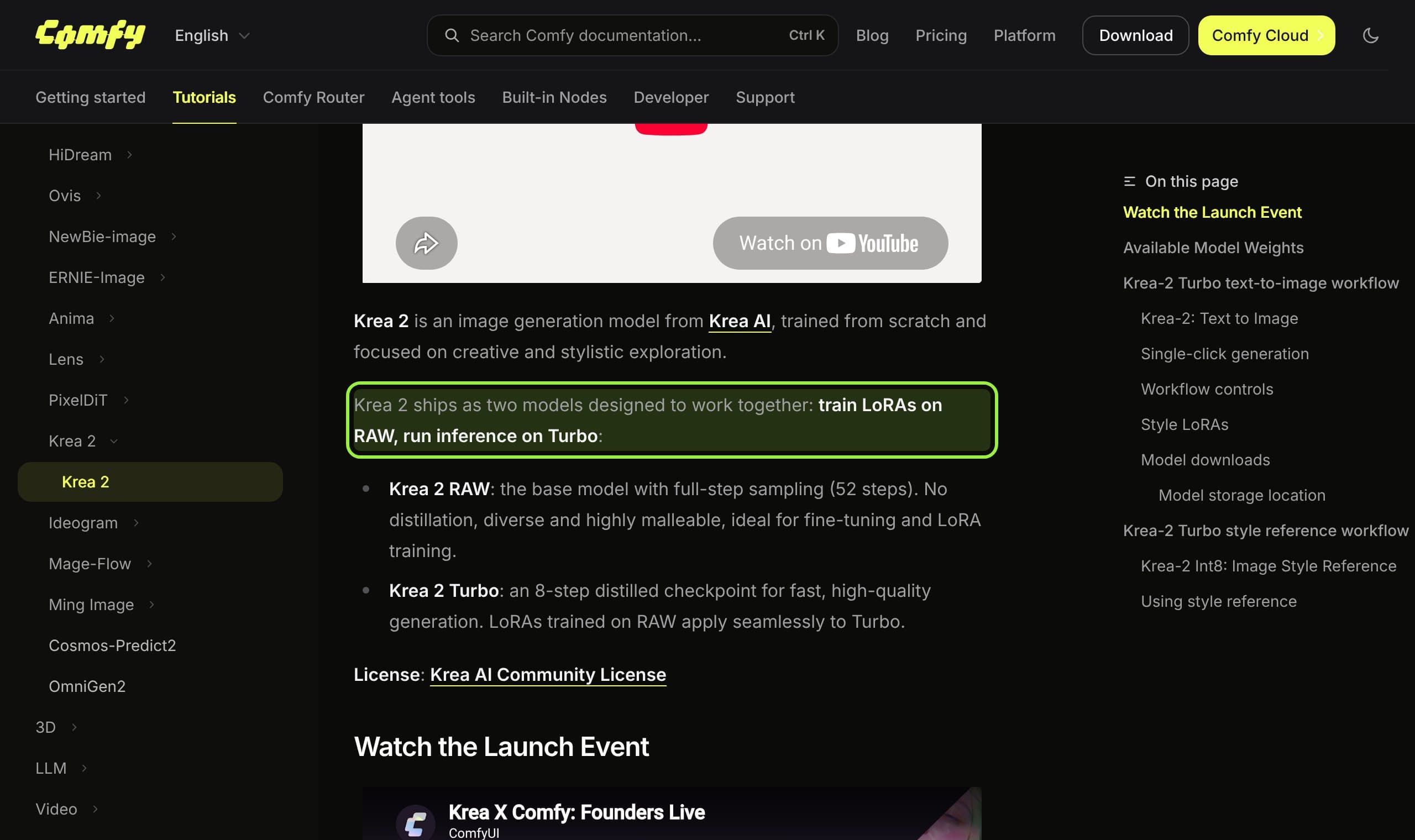
- Train a character LoRA on RAW and run it on Turbo. That is Krea's and Comfy's stated pairing, and the template already has the LoRA slot, model-only, ready for it (how to train one).
- Check the license before you earn money. Commercial use is allowed only below USD 1,000,000 of company-wide yearly revenue, affiliates included.
What you download, and what it weighs
The template's note lists four files for the default path: the FP8 Turbo checkpoint, the FP8 text encoder, the VAE and, optionally, a style LoRA. We read the sizes from the Hugging Face repository listing. Added up, the three required files come to about 18.6 GB, and the text encoder alone is 28 percent of that, which is the pattern in our download size study.
| File | Folder | Size | Role |
|---|---|---|---|
| krea2_turbo_fp8_scaled.safetensors | models/diffusion_models | 13.14 GB | The Turbo checkpoint the template loads |
| qwen3vl_4b_fp8_scaled.safetensors | models/text_encoders | 5.24 GB | Reads the prompt, and also writes the enhanced one |
| qwen_image_vae.safetensors | models/vae | 0.25 GB | Decodes the latent to pixels |
| krea2_darkbrush.safetensors (one of nine style LoRAs) | models/loras | 0.47 GB | Optional, off by default |
| krea2_turbo_nvfp4.safetensors (alternative) | models/diffusion_models | 7.67 GB | Smaller file; community notes say it pays off only on Blackwell cards, which we did not test |
| krea2_turbo_bf16.safetensors (alternative) | models/diffusion_models | 26.28 GB | Full precision for large cards |
Krea 2 at a glance
- Released
- June 22, 2026 (model card); ComfyUI support announced June 23
- Size
- 12 billion parameters per the card; the Hub metadata shows 13B
- Turbo
- 8 steps, CFG 0.0 in the vendor's own code, a post-trained and distilled checkpoint
- RAW
- 52 steps, CFG 3.5, meant for fine-tuning; the card says it is not recommended for inference
- License
- Krea 2 Community License, gated download
- Minimum ComfyUI
- 0.26.0 per the launch post; update first, as the template's own note says
The graph in one picture
Wiring read from the template's JSON. The enhancer feeds the encoder only when `prompt_enhance` is on; otherwise your text goes straight through.
Node by node
- 1
UNETLoader and CLIPLoader
The loader pair points at
krea2_turbo_fp8_scaled.safetensorswith weight type default, and atqwen3vl_4b_fp8_scaled.safetensorswith the CLIP type set tokrea2. That type is the usual first failure: on a ComfyUI that predates Krea 2 the type is missing from the list. One commenter on Comfy's launch post reported exactly that. - 2
The prompt and the enhancer
A multiline text node holds your prompt and another holds a long system prompt. A TextGenerate node, fed by the same Qwen3-VL encoder, writes one expanded paragraph with a length setting of 512 and sampling on. A boolean called
Refine Prompt?is saved as true, so the expansion is the default path. - 3
CLIPTextEncode
The chosen text, enhanced or yours, becomes the positive conditioning. Two switches decide which string arrives: one for the enhancer, one that appends the LoRA's trigger word when a style LoRA is enabled.
- 4
ConditioningZeroOut
There is no negative prompt box. The negative side is the positive conditioning zeroed out, which fits a model run with guidance at 1. Do not hunt for a negative field; there is none.
- 5
Resolution and the empty latent
A ResolutionSelector, saved on
1:1 (Square), feeds width and height into the latent. The docs say to set its megapixels value to 2.0 for 2K; the subgraph's own default latent is 1024 by 1024, and Krea's code example for Turbo uses 2048 by 2048. For 9:16 sizes see our size guide. - 6
KSampler
Steps 8, CFG 1, sampler euler, scheduler simple, denoise 1, seed set to randomize. Fix the seed when you compare two prompts, otherwise you are comparing seeds.
- 7
LoraLoaderModelOnly, behind a switch
One model-only LoRA loader sits between the checkpoint and the sampler.
Enable LoRA?is saved as false. The file saved in the loader iskrea2_darkbrushat strength 0.8, while the note beside the workflow recommends 1.0 for all nine style LoRAs, so set the strength yourself. - 8
VAEDecode and SaveImage
The VAE is the Qwen-Image one. SaveImage writes files with the prefix
Krea2_turboto the output folder.
The prompt enhancer and a recurring face
The system prompt inside the template is worth reading. Its first rule asks the model to preserve every subject, action, colour and spatial relationship and not to add props or characters. Another rule says that if your prompt is already detailed it should be lightly polished instead of heavily expanded. That is a careful brief, and for a one-line idea it will help.
The template's own note also says the built-in module can be replaced by OpenAI or Gemini API nodes. That sends your prompt to a third party, which matters if you have not decided what your character's prompts may reveal. The identity itself is better held by references or a trained LoRA than by any paragraph; see the consistent character guide.
RAW, Turbo and the LoRA lane
RAW is the undistilled base with 52 steps and CFG 3.5 on its card, and Krea says outright that it is not recommended for inference. Turbo is a post-trained, distilled release. The sensible pipeline for a character is therefore two stages: train on RAW, then load the result into this template's LoRA slot and generate on Turbo. The wider trade-offs of base and distilled files are in our explainer.
There is also a 0.47 GB rank-64 krea2_turbo_lora in the repository. A reply on the repo's discussion says it makes RAW behave like Turbo, which would make it a speed LoRA. We did not verify that, and the file has no model card of its own.
What creators are saying
Tried RAW at 50 steps and every guidance value from 1 to 10 and it looked far worse than Turbo, yet Turbo images look alike across seeds, which they dislike.
A reply suggests running RAW with the Turbo LoRA at strength 0.6 and 12 steps as a middle path.
Only the darkbrush LoRA from the example workflow was still downloadable; replies say the others were pulled over training issues and that some LoRAs crash their machine.
One poster says they run the model in under 4 GB of VRAM without quantization using their own repository. We did not test the claim.
A commenter on the launch post found the Load CLIP type list had no krea2 entry and got an error, the sign of an outdated ComfyUI.
QuestionComfy blog comments
Settings cheat sheet
Keep this next to the template
- Checkpoint
- krea2_turbo_fp8_scaled, weight type default
- Text encoder
- qwen3vl_4b_fp8_scaled, CLIP type krea2
- VAE
- qwen_image_vae
- Sampler
- euler, simple, 8 steps, CFG 1, denoise 1
- Negative prompt
- None; the conditioning is zeroed out
- Size
- Start at 1024 by 1024; set megapixels to 2.0 for 2K
- Prompt enhancer
- On in the saved file; turn it off for a fixed character
- Style LoRA
- Off in the saved file; model-only; the note recommends strength 1.0
- Fix first
- Update ComfyUI if the krea2 CLIP type is missing
The license, read at the source
Section 2.3 of the Krea 2 Community License allows commercial use of the model, derivatives or outputs only if you, including all affiliated entities under common ownership, have total company-wide annual revenue under USD 1,000,000 on a trailing twelve-month basis. At or above it you need an enterprise license first, and if you cross the line while using the model you must stop commercial use and contact Krea. The text we read has no seat limit, although some third-party blogs mention one.
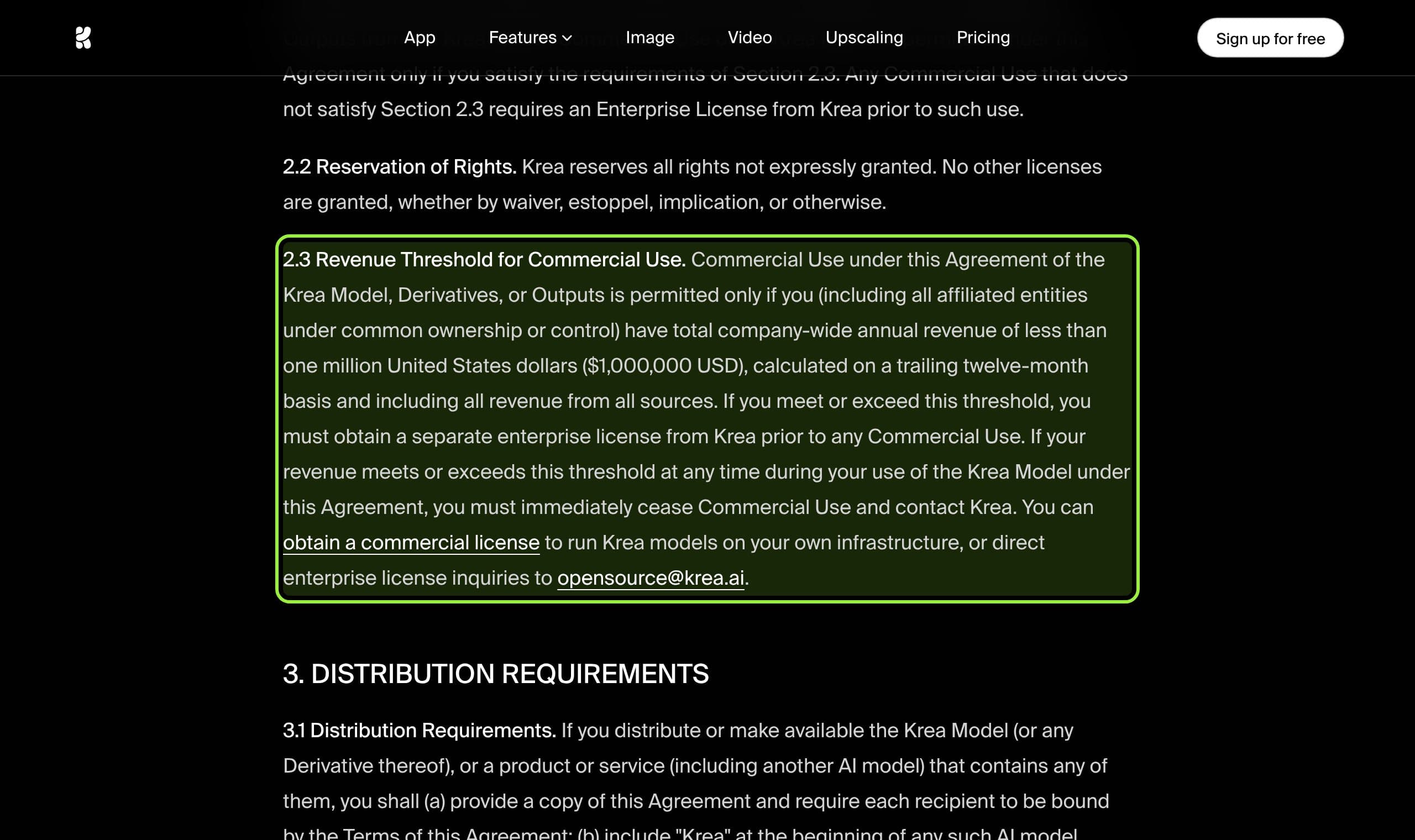
Another clause matters if you ever offer the model to others: deployers must apply reasonable content filtering. A private ComfyUI for your own character is not that, but a service built on it could be. We are not lawyers; read the page before you rely on it.
Running it from the studio
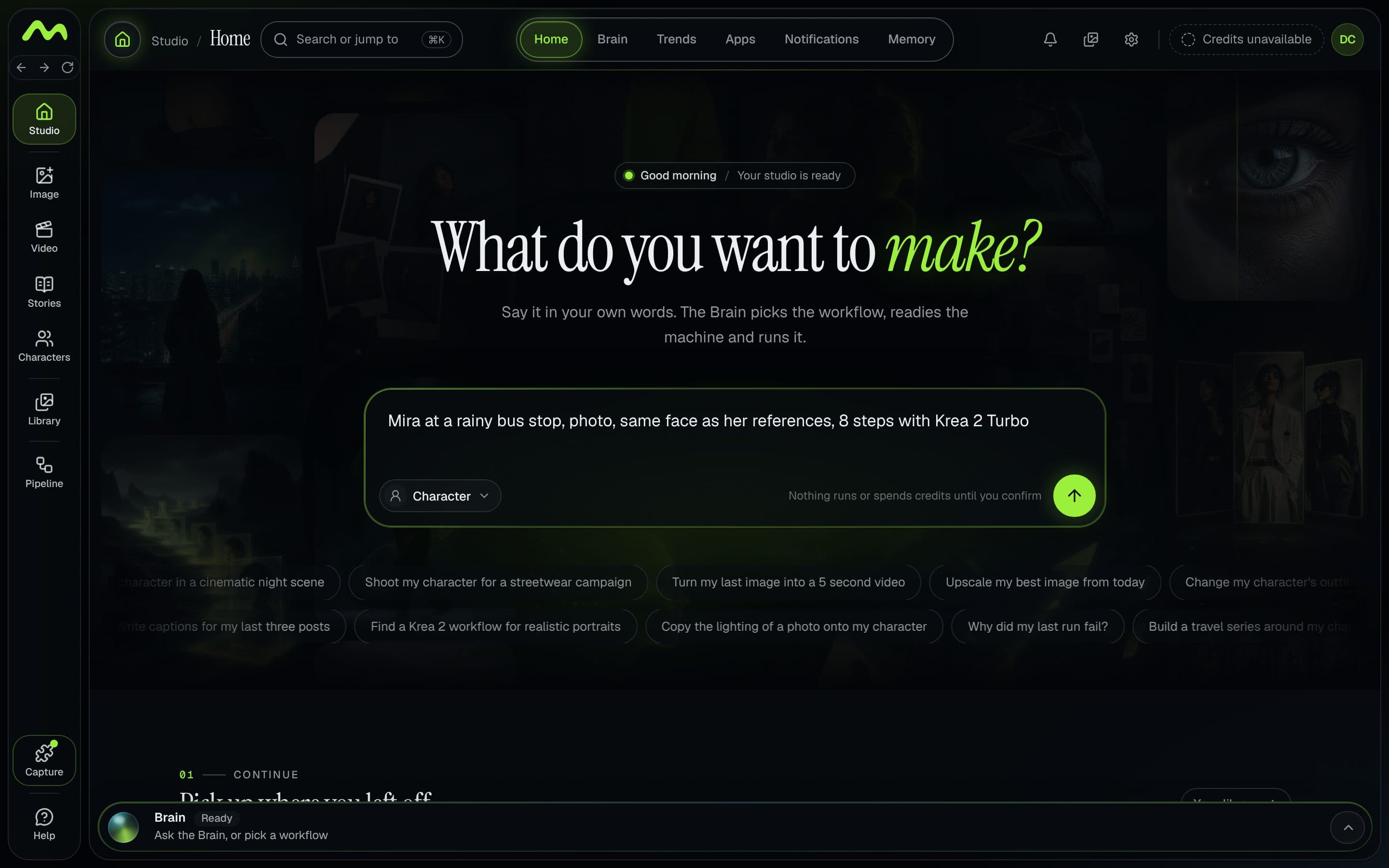
If you would rather not wire any of this by hand, Musetta runs on your own ComfyUI, installs the models and nodes a workflow is missing, and keeps a character's reference photos next to the request. Nothing runs until you confirm. We built this article from the template itself, not from the studio, so treat the screenshot as an example of the request, not as a test of the workflow.
What we could not verify
- How much the enhancer's output varies between runs of the same prompt.
- Any timing or VRAM figure for the FP8 file on a specific card; the template and the docs give none.
- How well a character LoRA trained on RAW holds a face on Turbo. Krea and Comfy describe the pairing; we found no measurement.
- Whether the 12B or 13B figure is right. The model card text says 12B and the Hub metadata says 13B.
Questions
- What settings does the official Krea 2 Turbo ComfyUI template use?
- The saved template uses 8 steps, CFG 1, euler, the simple scheduler and denoise 1, with the FP8 Turbo checkpoint, the Qwen3-VL 4B FP8 text encoder (CLIP type krea2) and the Qwen-Image VAE.
- How do I turn off the prompt enhancer in the Krea 2 workflow?
- Open the Text to Image subgraph and set the Refine Prompt boolean (prompt_enhance) to false. It is saved as true, so your text is rewritten by the Qwen3-VL encoder unless you change it.
- Should I use Krea 2 RAW or Turbo?
- Use Turbo to generate and RAW to train. Krea's model card says RAW is not recommended for inference, and Comfy's docs say LoRAs trained on RAW apply to Turbo.
- How much do the Krea 2 Turbo files weigh?
- The three required files are 13.14 GB for the FP8 checkpoint, 5.24 GB for the text encoder and 0.25 GB for the VAE, about 18.6 GB in total, per the Hugging Face file listing.
- Can I use Krea 2 for a monetized account?
- Only while your company-wide revenue, affiliates included, stays under USD 1,000,000 over the trailing twelve months, per section 2.3 of the license. Above that you need an enterprise license from Krea.
Sources
- 01Krea 2 ComfyUI tutorial · ComfyUI docs
- 02Krea-2: Text to Image template · Comfy
- 03Krea 2 Open-Source Models are now available in ComfyUI · Comfy blog, 2026-06-23
- 04Krea-2-Turbo model card · Krea, Hugging Face, 2026-06-22
- 05Krea-2-Raw model card · Krea, Hugging Face, 2026-06-22
- 06Comfy-Org/Krea-2 files · Comfy-Org, Hugging Face
- 07Krea 2 Community License Agreement · Krea
- 08Turbo vs Raw discussion · Hugging Face discussions
- 09Workflow LoRAs missing discussion · Hugging Face discussions
Researched and written by the Musetta editorial desk with AI assistance, from the sources above. Numbers come from those sources; nothing is benchmarked by us unless the article says so. Spotted an error? Tell us on Discord and we fix it.