In short
lvladikov's MOSS-SFT-Distill-4step-LoRA (Apache 2.0, released 19 November, checkpoint replaced in place on 20 November) runs MOSS-Image SFT in 4 steps at CFG 1 instead of 50 at CFG 3. Its ComfyUI workflow is the official template with five settings you must not touch: the bf16 base, strength 1.0 on the _comfyui file, Manual Sigmas 1.0, 0.91, 0.717, 0.024, 0.0, euler, and a Basic Guider. It is about 14 times cheaper per picture on the author's numbers, but the portrait test keeps only 0.44 of the teacher's fine texture, so test it on your character before switching.
If your character's feed runs on MOSS-Image SFT, each picture costs 50 steps at CFG 3, which is 100 model calls. A LoRA released on 19 November, MOSS-SFT-Distill-4step-LoRA, does it in 4 calls, and its author measured 26.6 seconds of GPU time for 22 pictures at 1024×1024 against 387.3 seconds for the full model.
The workflow that ships with it looks like the official MOSS template, and that is the trap: five of its settings are what make 4 steps work, and changing any of them quietly gives you a worse picture rather than an error. Below is the text-to-image graph read from its JSON, node by node, then the edit graph, the files, and what the numbers mean for a recurring face.
The graph at a glance
The sampling path of moss_sft_4step_lora_t2i_local.json: UNETLoader, LoraLoaderModelOnly, CLIPLoader, CLIPTextEncode, BasicGuider, ManualSigmas, SamplerCustomAdvanced, EmptyFlux2LatentImage, VAEDecode, SaveImage. The file has 22 nodes in all, counting two notes and the optional prompt upsampler.
There is no KSampler. The graph uses ComfyUI's split sampler: a guider, a sampler choice, a sigma list and noise go into SamplerCustomAdvanced. That split is what lets the author hand the model an exact noise schedule instead of a named scheduler.
Node by node
Loaders: the bf16 base, then the LoRA at 1.0
UNETLoader loads moss_image_sft_bf16.safetensors (10.16 GB). Comfy-Org also hosts an int8 file at 5.41 GB, and the workflow note says plainly that the LoRA's strength factor was measured on bf16 only, so the int8 pairing is untested by the author.
LoraLoaderModelOnly loads the LoRA file whose name ends in _comfyui at 1.0. The reason is unusual: ComfyUI adds a LoRA to bf16 weights and rounds the sum, and for a change this small the author measured that roughly an eighth of it is lost. The _comfyui file stores a factor of 1.12 in its alpha values to put it back. The plain file is for diffusers. Raising the strength above 1 does not add detail: the card measured doubled edges at 2.74 against 1.46 for a fine-texture gain from 0.85 to 0.87.
Text: Qwen3.5 9B and an optional upsampler
CLIPLoader loads qwen3.5_9b_w4a8_gptq.safetensors (7.34 GB) with type moss_image. The card's sample pictures used the full-precision encoder (19.31 GB); the workflows use the 4-bit one. Your prompt reaches CLIPTextEncode through a switch: off by default, it passes your words as typed; on, a TextGenerateV2 node uses the same Qwen model to rewrite them into a caption of about 250 words.
Turn it on, or write long prompts yourself, if you render big. The note in the graph reports that at 3552×2000 a 21-word prompt came out soft and hazy while the same scene in 100 words or more came out sharp. The workflow's default size, 2848×1600, is already past the 12 trained sizes, which run from 768×512 to 1824×1024 and 1024×1824.
Sampling: why Manual Sigmas and CFG 1
ManualSigmas holds 1.0, 0.91, 0.717, 0.024, 0.0, MOSS's own 4-step schedule. A distilled LoRA learns to denoise from exactly those noise levels. ComfyUI's simple scheduler at 4 steps lands on different ones, so the picture still renders, just worse, which is why this is the setting most likely to be broken by someone tidying the graph.
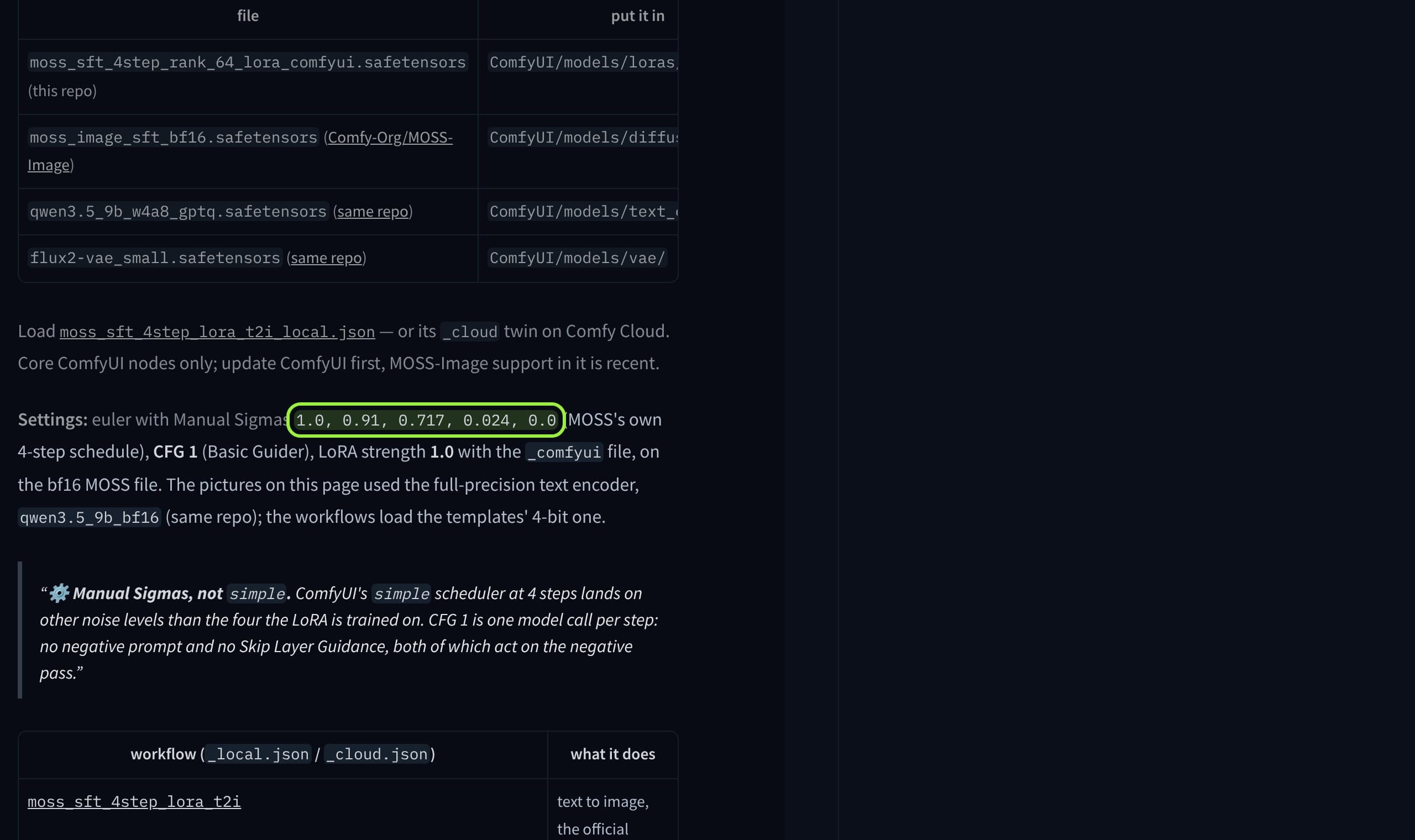
BasicGuider means CFG 1: one model call per step and no negative prompt. That is half of where the speed comes from. It also means negative prompts do nothing here, the same behaviour we covered in why a negative prompt stops working at CFG 1. The repo ships a separate experimental workflow at CFG 2 with a negative prompt for the cases where you need one.
KSamplerSelect is euler, RandomNoise starts at seed 4242 and randomizes after each run, and EmptyFlux2LatentImage sets the size, because MOSS decodes with the FLUX.2 VAE (flux2-vae_small, 0.25 GB). Width and height must be multiples of 16.
Cheat sheet: keep these as set
- Base model
- moss_image_sft_bf16 (not int8)
- LoRA file
- the _comfyui file, strength 1.0
- Sampler
- euler via SamplerCustomAdvanced
- Schedule
- ManualSigmas 1.0, 0.91, 0.717, 0.024, 0.0
- Guidance
- BasicGuider, CFG 1, no negative prompt
- Steps
- 4 (the sigma list sets them)
- Trained sizes
- 768×512 up to 1824×1024 and 1024×1824
- Prompt length
- 100+ words past the trained sizes
- Files to download
- about 18.3 GB with the 4-bit encoder
- ComfyUI version
- 0.42.0+ for text to image, 0.43.0+ for edit
The edit workflow
moss_sft_4step_lora_edit_i2i is the official MOSS edit template rebuilt the same way. LoadImage feeds ImageScaleToTotalPixels (1.0 megapixel, 16-pixel steps), GetImageSize copies that size to the latent, and TextEncodeMOSSImageEdit encodes your instruction with the photo as a reference. A second LoraLoaderModelOnly chains Comfy-Org's moss_image_edit_lora_rank_64_bf16 (0.30 GB) at 1.0 after the 4-step LoRA.
The card says this runs 4 steps at CFG 1 instead of the template's 30 at CFG 4, and an ImageCompare node shows before and after. For a character feed this is the more interesting graph: changing an outfit or a background on an approved picture is a daily job, and our Krea 2 Identity Edit vs LoRA comparison covers why editing an existing face often beats generating a new one.
| File | Folder | Size | Used by |
|---|---|---|---|
| moss_image_sft_bf16 | diffusion_models | 10.16 GB | all |
| qwen3.5_9b_w4a8_gptq | text_encoders | 7.34 GB | all |
| flux2-vae_small | vae | 0.25 GB | all |
| moss_sft_4step_rank_64_lora_comfyui | loras | 0.59 GB | all |
| moss_image_edit_lora_rank_64_bf16 | loras | 0.30 GB | edit only |
| qwen3.5_9b_bf16 (optional) | text_encoders | 19.31 GB | the card's sample pictures |
What the numbers say
Source: MOSS-SFT-Distill-4step-LoRA detailed README, Performance
That is 17.6 seconds a picture for the full model against 1.2 to 1.3 for this LoRA, with loading, text encoding and decoding included. At 1824×1024 the LoRA's 22-picture job took 41.6 seconds. The older akhaliq 4-step LoRA is slightly faster, but on the author's five-prompt test it kept 0.59 of the teacher's fine texture against 0.85 to 0.91 for this one, and spelled every requested word right on 12 of 15 text prompts against 14.
Now the number that matters for a recurring face. Fine texture averages 1.16× the teacher's over 22 prompts, but the spread runs from 0.44 on the portrait to 2.32 on a pianist's close-up. Machinery, feathers and city lights gain detail; the portrait, a watercolour and a pizza lose it. The author notes the portrait's skin still shows freckles and pores at 1:1, and the side-by-side sheets are on the card, so look at them before deciding.
The second checkpoint fixed two things from the first: dark scenes are now +0.6 L* against the teacher on the nine darkest prompts, down from +2.8, and doubled edges fell from 1.12× the teacher's to 1.00×. None of this measures whether a character LoRA stacked on top still holds its face; nobody has published that test yet.
What creators are saying
What creators are saying
The 30K checkpoint looks a little more saturated than the 15K one, but quality is better, with fewer colour blotches.
ComplaintHugging Face discussion on the LoRA
One user merges the LoRA into the SFT bf16 file, converts the result to int8 with Comfy's model tools, and uses a CFGNorm node at 0.92 to 0.95 to calm the saturation.
A tester asked for prompt enhancing in the demo, saying MOSS is a bit too sensitive to short prompts.
A user who compared nine MOSS turbo LoRAs against the 50-step baseline on painting texture picked this one as the closest.
Praisereported by ComfyUI Wiki
Early reports say the edit workflow and layout prompting hold up, but photoreal faces are weaker, and one user saw occasional missing limbs.
Complaintreported by ComfyUI Wiki
Should a character feed switch?
Use it for drafts, layouts, backgrounds and edits, where 14 times less GPU time turns a batch of 40 tries into the cost of three. It is Apache 2.0 like the base model, so a monetized account can use it. If you are deciding between MOSS checkpoints in the first place, our Kromoss vs MOSS SFT comparison and the MOSS Image review cover that.
Keep the 50-step render for the final picture of a face until you have run your own character through both at the same seed. The 0.44 portrait number is one prompt, not a verdict, but it is the one prompt that looks like your feed. If the face drifts, the fix is still a character LoRA, loaded in a second LoRA loader after this one, which is also where the card suggests realism LoRAs go.
Where Musetta fits
Musetta runs on your own ComfyUI, installs the models a workflow is missing, and keeps each character's reference photos next to every request, so trying a 4-step graph against your 50-step one is one request, not a rebuild. Read more in our guide to a consistent AI character in ComfyUI.
Questions
- Why does the MOSS 4-step LoRA use Manual Sigmas instead of the simple scheduler?
- The LoRA was trained on MOSS's own 4-step noise levels, 1.0, 0.91, 0.717, 0.024 and 0.0. The simple scheduler at 4 steps picks other levels, so the picture still renders but loses quality.
- What strength should the MOSS 4-step LoRA run at in ComfyUI?
- 1.0, with the file ending in _comfyui. That file already carries a 1.12 factor that makes up for ComfyUI's bf16 rounding. Above 1.0 the author measured more doubled edges and almost no extra detail.
- Does the 4-step LoRA work with the int8 MOSS file?
- The author measured the strength factor on the bf16 file only, so the int8 pairing is untested. One user merges the LoRA into bf16 first and converts the merged model to int8.
- Can I use a negative prompt with the 4-step LoRA?
- Not at CFG 1, where the negative pass does not run. The repo has an experimental workflow at CFG 2 with a negative prompt, at twice the model calls per step.
- Is the MOSS 4-step LoRA licensed for commercial use?
- It is released under the Apache License 2.0, the same license as MOSS-Image SFT. The edit LoRA and other models the workflows load come under their own licenses.
Sources
- 01MOSS-SFT-Distill-4step-LoRA model card · Hugging Face, 2026-11-20
- 02MOSS-SFT-Distill-4step-LoRA detailed README · Hugging Face, 2026-11-20
- 03Checkpoint info and SHA-256 · Hugging Face, 2026-11-20
- 0430K checkpoint released (discussion) · Hugging Face, 2026-11-20
- 05Demo for this model on Spaces (discussion) · Hugging Face, 2026-11-19
- 06MOSS-Image in ComfyUI: Text-to-Image, Edit, and Layout Workflows · ComfyUI docs
- 07Comfy-Org/MOSS-Image repack · Hugging Face
- 08MOSS-Image SFT · OpenMOSS
- 09akhaliq/MOSS-Image-SFT-4-steps · Hugging Face
- 10MOSS-Image 4-Step LoRA: eDMD Distillation Keeps Fine Detail · ComfyUI Wiki, 2026-11-19
Researched and written by the Musetta editorial desk with AI assistance, from the sources above. Numbers come from those sources; nothing is benchmarked by us unless the article says so. Spotted an error? Tell us on Discord and we fix it.