In short
Every Turbo-style model creators run this month (MiniMax H3 Image, P-H3-Image, Krea 2 Turbo, the distilled FLUX 3 Klein) samples at CFG 1. At CFG 1 the guidance formula cancels the negative prompt, and ComfyUI's sampler does not even compute it. To get a no back: write it positively, add the core Normalized Attention Guidance node (about twice the time per image in one user's log), or render on a base model with real CFG.
If your character keeps showing up in sunglasses you never asked for, and sunglasses sits right there in the negative box, the box is not broken. On a model sampled at CFG 1, ComfyUI never runs the negative prompt at all. The line that decides it is in comfy/samplers.py: when the CFG value is 1.0, the negative conditioning is set to None before the model is called. MiniMax H3 Image, P-H3-Image, Krea 2 Turbo and the distilled FLUX 3 Klein all ship at CFG 1.
This explainer shows why, which of this month's models it hits, and the three ways to get a no back, with what each one costs you in time and quality.
What CFG actually does with your negative prompt
Classifier-free guidance, from the 2022 paper by Ho and Salimans, runs the model twice per step: once with your prompt and once without it. It then takes the difference and pushes the image further in your prompt's direction. In ComfyUI the second run uses whatever you wired into the sampler's negative input, which is how a negative prompt became a thing: the image gets pushed away from it.
The formula in ComfyUI's code is uncond + (cond - uncond) * cfg. Put 1 in for cfg and the two uncond terms cancel: the result is cond, your positive prompt alone. The negative has no say, so ComfyUI saves the work. Its sampling function checks math.isclose(cond_scale, 1.0) and, unless a node has switched that shortcut off, sets the negative to None. One model call per step instead of two.
Simplified from `cfg_function` and `sampling_function` in ComfyUI's comfy/samplers.py. At CFG 1 the second pass is never run.
Distilled models run at CFG 1 because they were trained to. Distillation teaches a student model to reach the teacher's guided result in a few steps without the second pass, which is where most of the speed comes from. Turning CFG back up on such a model does not restore the negative; it pushes the model somewhere it was never trained to go. That is the burnt, over-saturated look covered in our distilled vs base explainer.
Which models this hits right now
Most of what creators download this week is distilled. The cards and Comfy templates say so plainly; the table puts them side by side with the base checkpoints that still take a real CFG.
| Model | Steps | CFG | Negative prompt |
|---|---|---|---|
| MiniMax H3 Image | 6, fixed | 1 (other values: HTTP 400) | Rejected |
| P-H3-Image | 8 | No CFG | None: no guider at all |
| Krea 2 Turbo | 8 | 1 | No box; template feeds zeroed conditioning |
| FLUX 3 Klein (distilled) | 16 | 1 | Not mentioned; ignored at CFG 1 |
| FLUX 3 Klein Base | 50 | 3.5 | Works |
| Krea 2 Raw (base) | 52 | 3.5 | Works; Krea does not recommend Raw for inference |
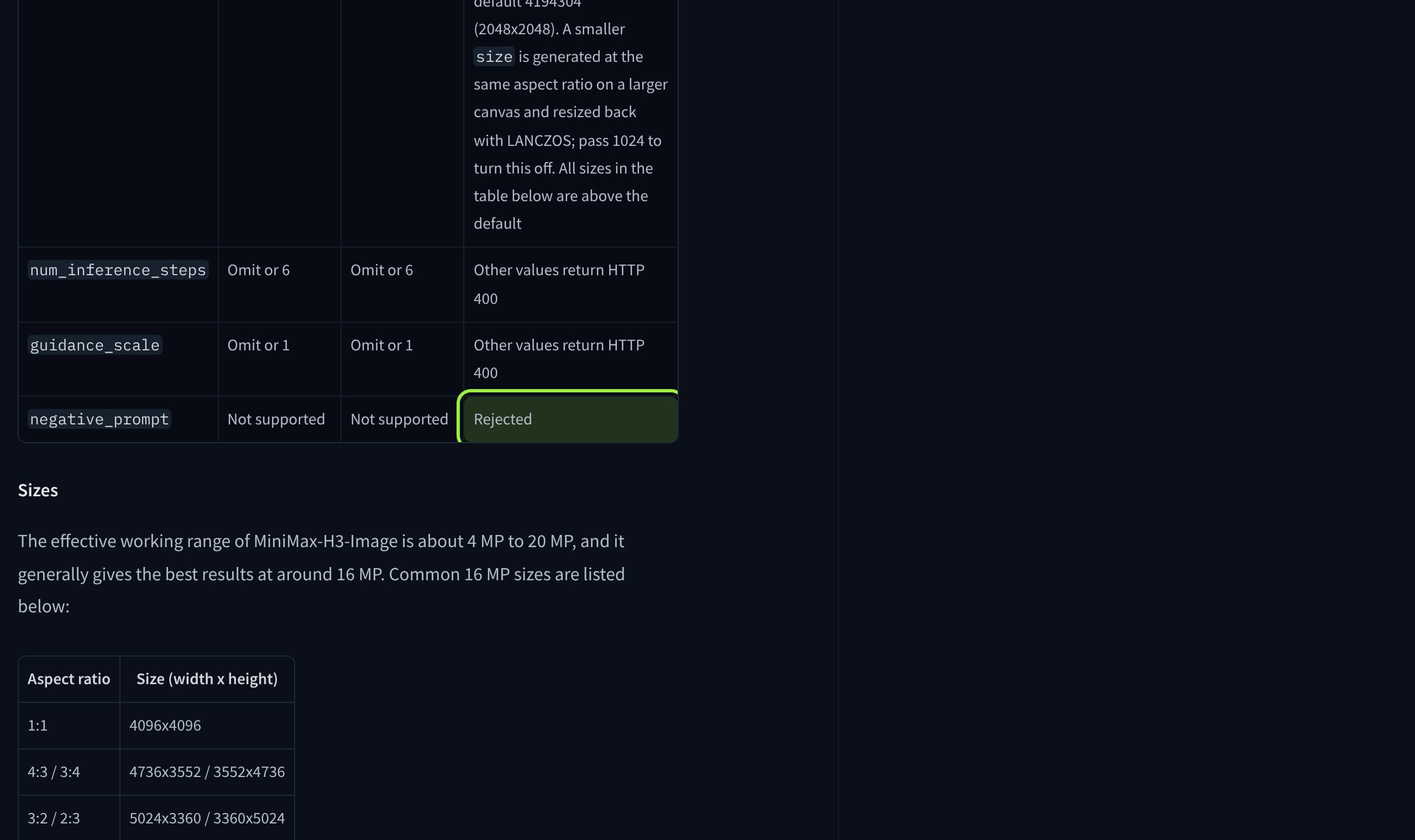
Two of these are worth a closer look. The card for MiniMax H3 Image says the checkpoint is "distilled to 6 sampling steps (6 NFEs) with no classifier-free guidance", and its official server answers a request with a negative prompt by refusing it. In ComfyUI the template runs euler, simple, 6 steps, CFG 1, as covered in our H3 Image review. Krea 2 Turbo's Comfy template has no negative field at all: the negative input gets the positive conditioning zeroed out, which is the honest way to wire a model that ignores it (our breakdown of that template).
Three ways to get a no back
- 1
Say it positively (free, try first)
Instead of
sunglassesin the negative, writebare face, eyes visiblein the prompt. Distilled models follow long, specific prompts well, and the prompt upsamplers shipped with Klein and Krea 2 Turbo make it longer still. Check the upsampler did not reintroduce what you wanted gone; it rewrites your words. - 2
Add Normalized Attention Guidance (the core node)
ComfyUI has shipped a Normalized Attention Guidance node in core since PR #12500, merged 17 February 2026. Put it between the model loader and the sampler, keep CFG at 1 and wire a real negative prompt. It is marked experimental, and the PR lists Flux, Flux2, Klein, Chroma and Hunyuan Video. We found no confirmed test on MiniMax H3 Image.
- 3
Render the shot on the base model
Klein Base at 50 steps and CFG 3.5 takes a negative prompt the classic way. It is slower per image and looks different from the distilled file, so keep it for the shots that need the exclusion, or use it as the model you train your character LoRA on.
- 4
Use a model-specific NAG node where core does not reach
For Krea 2 there is a community node, ComfyUI-Krea2-NAG, released in August 2026. Its notes say regular CFG batches are not supported, so keep CFG at 1.0 with it. Install it like any other missing custom node.
How NAG works, and what it costs
NAG comes from a 2025 paper titled "Normalized Attention Guidance: Universal Negative Guidance for Diffusion Models". Its abstract states the problem this article is about: CFG "fails under aggressive sampling step compression". Rather than mixing two final predictions, NAG works inside the model's attention. It takes the attention output for the positive and the negative, pushes away from the negative by nag_scale, then clamps the result to at most nag_tau times the positive's size, and blends it back by nag_alpha. The clamp is what keeps a few-step model from blowing out.
The core NAG node's inputs (comfy_extras/nodes_nag.py)
- nag_scale
- Default 5.0, range 0 to 50. How hard to push away from the negative
- nag_alpha
- Default 0.5, range 0 to 1. 1.0 replaces the attention fully, 0 does nothing
- nag_tau
- Default 1.5, range 1 to 10. Ceiling on how far the guided output may grow
- CFG on the sampler
- Leave at 1. The node switches the CFG 1 shortcut off by itself
- Empty negative
- No effect: the node only acts when both positive and negative are in the batch
- Status
- Experimental, category advanced/guidance
The price follows from the code. The node calls disable_model_cfg1_optimization(), so the negative pass is computed again on every step: two model calls instead of one, as before distillation. One user's log on FLUX.2 Klein 4B, in ComfyUI issue #12707, shows it.
Source: ComfyUI issue #12707
That is 2.3 times the time, on one machine, with default NAG values. In the same report the first images looked identical to the no-negative run; the reporter retested on newer ComfyUI in June, said it now works, including in edit workflows, and closed the issue. Another user tried NAG with FLUX.2 dev on 8 GB of VRAM and gave up after 20 minutes at about 10%. On a small card the doubled pass can push you from fast into unusable.
What creators are saying
Native NAG on FLUX.2 Klein 4B doubled generation time, 23.54 s against 10.04 s, yet the picture matched the run with no negative prompt.
Retested on a newer ComfyUI and frontend: NAG now works as expected, edit workflows included.
With FLUX.2 dev on an 8 GB card, NAG reached roughly 10% after 20 minutes, so it was abandoned as unusable.
ComplaintComfyUI GitHub issue #12707
Running Z-Image Turbo slightly above CFG 1, an empty text encode as the negative gave cleaner images than the template's zeroed conditioning.
Z-Image Turbo is built for CFG 1 and takes no negative prompt; the distortion comes from raising CFG, and the regular Z-Image template is the one for negatives.
TipComfy-Org workflow_templates issue #931, a contributor's reply
What this means for a recurring character
Character feeds lean on negatives more than most work: no second person in frame, no glasses on a face that never wears them, no logo on a jacket. On a distilled model none of that is enforced. Build the exclusions into the description of the character itself, so every request carries them, and test with a fixed seed: same seed, with and without NAG, so you are comparing the node and not two random draws.
Do not chase a vanished accessory with CFG. A face that is already slipping on a distilled model drifts further at CFG 3 or 4, the opposite of what a consistent character needs.

Verdict
If a negative prompt is doing nothing, check the CFG value before anything else. At 1.0 it cannot work, by arithmetic and by ComfyUI's own shortcut, and every popular Turbo, Lightning and distilled checkpoint sits there. Write the exclusion into the positive prompt first; it costs nothing and fixes most cases. Reach for the core NAG node when a specific object keeps coming back, accept roughly double the time per image, and verify on a fixed seed that it changed anything. Keep the base model, with a real CFG, for the shots where the exclusion is the whole point.
If you would rather not rewire graphs, Musetta runs on your own ComfyUI, installs the nodes a workflow is missing and keeps each character's reference photos, so a with-and-without NAG test is one request. Disclosure: Musetta publishes this journal.
Questions
- Why is my negative prompt ignored in ComfyUI?
- Most likely your sampler is at CFG 1. The guidance formula uncond + (cond - uncond) x CFG reduces to the positive prompt alone at 1, and ComfyUI skips computing the negative to save time. Turbo, Lightning and distilled checkpoints all run at CFG 1.
- Can I just raise CFG on a Turbo model to make the negative work?
- Above 1 the negative is used again, but distilled models were trained without guidance, so higher CFG usually burns or distorts the image. MiniMax H3 Image's official server rejects any guidance value other than 1.
- Does the NAG node slow generation down?
- Yes. It turns off the CFG 1 shortcut, so the negative pass runs on every step again. One user's log on FLUX.2 Klein 4B showed 23.54 seconds with NAG against 10.04 without.
- Does NAG work with MiniMax H3 Image or Krea 2 Turbo?
- The core node's PR lists Flux, Flux2, Klein, Chroma and Hunyuan Video; we found no confirmed test on MiniMax H3 Image. For Krea 2 a community node, ComfyUI-Krea2-NAG, exists and asks for CFG 1.0. Test on a fixed seed before relying on it.
- What should the negative input be on a CFG 1 model?
- It does not matter at exactly 1.0, because it is never computed. Comfy's Krea 2 Turbo template wires zeroed conditioning there, which is the clearest signal that nothing in that box will be used.
Sources
- 01comfy/samplers.py (sampling_function and cfg_function) · Comfy-Org
- 02comfy_extras/nodes_nag.py (Normalized Attention Guidance node) · Comfy-Org
- 03Implement NAG on all the models based on the Flux code (PR #12500) · Comfy-Org, 2026-02-17
- 04Native NAG node not applying negative prompt despite double inference time (issue #12707) · GitHub, 2026-03-01
- 05Z-Image-Turbo: sub-optimal negative input to K-sampler (issue #931) · GitHub, 2026-06-07
- 06Classifier-Free Diffusion Guidance · arXiv, 2022-07-26
- 07Normalized Attention Guidance: Universal Negative Guidance for Diffusion Models · arXiv, 2025-05-27
- 08MiniMax-H3-Image model card · MiniMax
- 09P-H3-Image model card · Pruna AI
- 10FLUX 3 Image Klein documentation · Black Forest Labs
- 11Krea 2 Turbo template · Comfy
- 12Krea-2-Raw model card · Krea
- 13ComfyUI-Krea2-NAG: negative prompting for Krea 2 Turbo · ComfyUI Wiki, 2026-08-10
Researched and written by the Musetta editorial desk with AI assistance, from the sources above. Numbers come from those sources; nothing is benchmarked by us unless the article says so. Spotted an error? Tell us on Discord and we fix it.