In short
Ming-Image 0.2 Design, a 6B model from Ant Group's inclusionAI, leads the Artificial Analysis open-weights arena at 1095 Elo against 1066 for MiniMax H3 Image. It is MIT licensed, with none of H3 Image's excluded territories (EU, UK, US, South Korea). It takes text only and ran about twice as slow per 2K image on one 16 GB card. Keep H3 Image for a recurring face; try Ming for posters, or if you are in an excluded territory.
If your character's feed is rendered with MiniMax H3 Image, a new name just passed it. Ming-Image 0.2 Design sits first among open-weights models on the Artificial Analysis text-to-image arena at 1095 Elo, 29 points above H3 Image's 1066, and it ships under the MIT license. That second fact matters more than the first if you live in the EU, the UK, the US or South Korea: H3 Image's license excludes all four.
We did not render a head-to-head ourselves. Everything below comes from the two model cards, the license, the arena page, a community benchmark run on one 16 GB card, and the first tests people posted. Read on 27 November 2026.
The short answer
- A recurring face from reference photos: MiniMax H3 Image. It takes up to 16 reference images; Ming-Image 0.2 Design takes a text prompt only, and no character LoRA for it exists yet.
- Posters, product shots, thumbnails with words on them: Ming-Image 0.2 Design is the one to test. inclusionAI built it for e-commerce hero images, UI drafts and spatial renders, and it leads the arena.
- You or your client are in the EU, UK, US or South Korea: Ming. Its MIT license has no territory or revenue clause; H3 Image's community license excludes those four territories.
- Speed on one consumer card: H3 Image. One tester's RX 7800 XT took 48.2 s per 2K portrait with H3 Image at 6 steps and 101.5 s with Ming at 12 steps.
Ming-Image 0.2 Design vs MiniMax H3 Image, row by row
| What | Ming-Image 0.2 Design | MiniMax H3 Image |
|---|---|---|
| Maker | inclusionAI (Ant Group) | MiniMax |
| Released | Late November 2026; the card dates its arena rank 25 November | Open weights 10 November 2026 |
| Diffusion model | 6B DiT | 33.1B, the H3 architecture without audio layers |
| Text encoder | Ling mini 2.0 (19.51 GB INT8 in Comfy-Org's files) | Qwen3-VL-32B (27.14 GB INT8, 15.69 GB NVFP4) |
| Defaults | 12 steps, CFG 1.0, 2048 x 2048 | 6 steps, no CFG, about 16 MP |
| Inputs | Text only for text-to-image (layer splitting is a separate model) | Text plus up to 16 reference images, edit in the same checkpoint |
| Arena Elo (open weights) | 1095, rank 1 (95% interval 1083 to 1107) | 1066, rank 2 (1052 to 1080) |
| Official hardware | One 80 GiB GPU in BF16, the minimum validated setup | Runs on 12 GB with INT8 and offloading (community report) |
| ComfyUI | Comfy-Org files (BF16, INT8); stock ComfyUI 0.46.0 or newer per the quant author | Native since ComfyUI 0.45.0 with an official template |
| License | MIT | MiniMax-H3-Image Community License: excludes EU, UK, US, South Korea; authorization above 1 million USD revenue |
The arena says Ming, by 29 points
Artificial Analysis ranks image models by pairwise human votes, anchored on FLUX.2 [dev] at 1000. On its open-weights board, Ming-Image 0.2 Design leads with 1095 from 4,936 votes. H3 Image follows at 1066 from 3,508, and Qwen-Image 2.1 is third at 1049. The intervals of the top two do not overlap, so the gap is more than noise.
Source: Artificial Analysis open-weights leaderboard, read 27 November 2026
Two cautions before you switch. The arena scores general prompts, not one face kept across 40 posts, and that is the job H3 Image was bought for. And Ming's lead was earned partly on what it was trained for: inclusionAI's first Design model ranked first among open models for UI and UX design in September. A poster-heavy prompt mix favours it.
Speed and VRAM on a 16 GB card
The official requirement for Ming is blunt: the README lists one GPU with at least 80 GiB of memory, in BF16, as the minimum validated setup. The full BF16 stack is about 49 GB. Comfy-Org's INT8 files bring it to 25.9 GB, and the community uploader kush2000 published W4A8 and W3A8 quants that cut the total to 12 to 19 GB.
The same uploader ran both models on one AMD RX 7800 XT with 16 GB of VRAM and 16 GB of system RAM, same prompts, seed 42. At 2K, H3 Image W4A8 took 42.6 to 48.2 s; Ming W4A8 took 101.5 to 103.8 s, at 12.9 to 13.9 GB of VRAM against 13.3 to 13.6 GB. Step counts differ (6 against 12), and it is one machine and one seed, so read it as a ratio, not a promise.
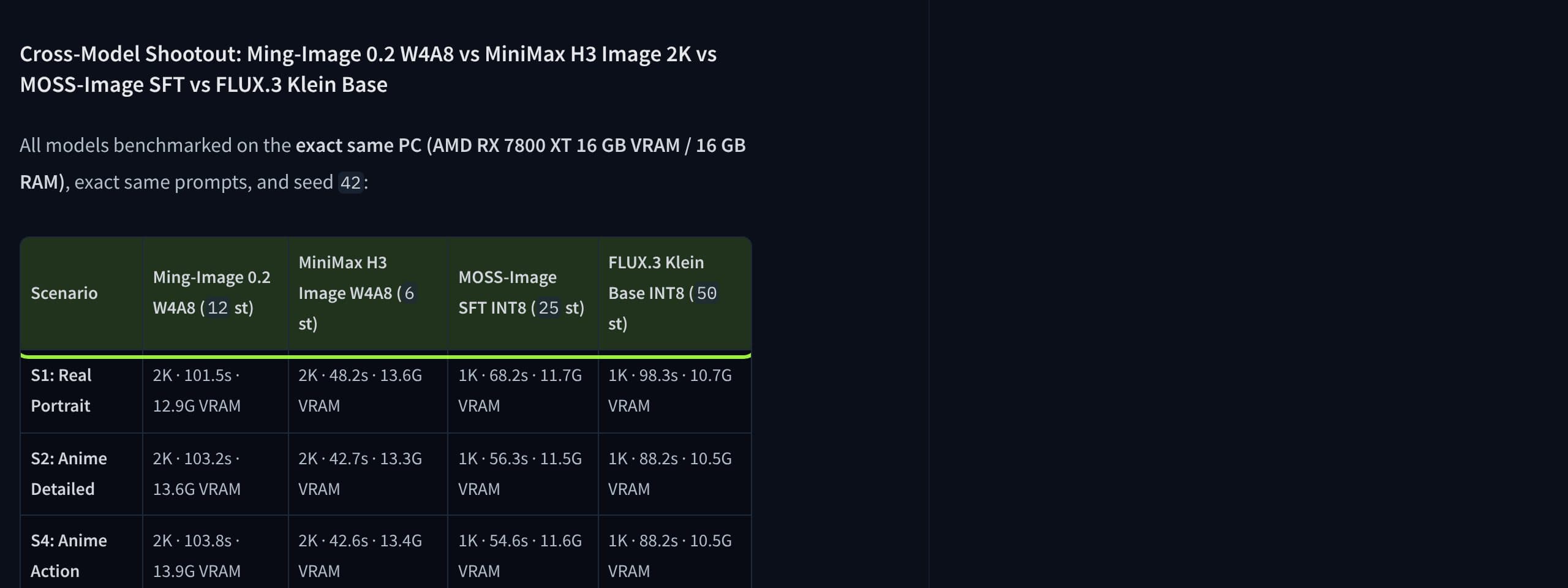
H3 Image renders around 16 MP natively, so at 2K it is working below its size. If you need its full resolution, the time per image grows; our H3 Image GGUF guide has the per-card numbers.
The license is the real difference
H3 Image's community license defines Excluded Territories as the European Union, the United Kingdom, the Republic of Korea and the United States, and asks for MiniMax's authorization once you and your affiliates pass 1 million USD of annualized revenue. Ming-Image 0.2 Design is MIT, and so are Comfy-Org's repackaged files and the community quants.
First tests of Ming-Image 0.2
What creators are saying
A tester ran 20 prompts through the BF16 build in ComfyUI at 2048 x 2048, 12 steps, CFG 1. Output looked strong, but a faint pixel pattern shows at high magnification.
A fake aerospace spec sheet came out with its dense layout intact; a few spelling artifacts remained.
Rebuilding a 4,503-character wiki page as a screenshot failed on every seed, and the tester measured checkerboard artifacts from the VAE.
Six ad briefs against SenseNova U1.6 and ChatGPT Images: Ming passed three, and added text nobody asked for, like an invented camera label.
The first request on the model page was for an undistilled version, the usual base for training LoRAs.
On H3 Image, a tester found face likeness from references slightly worse than in H3 video.
The pattern is consistent: Ming's strength is layout and composition, its weak spots are stray text and fine texture under magnification. None of the first tests looked at one character's face across a set, which is the question that matters here.
Which one for your character
Ming-Image 0.2 or H3 Image
- Same face across a feed, from reference photos
- H3 Image with your references, or a character LoRA on a model that has trainers
- Launch posters, merch mockups, thumbnails with a headline
- Ming-Image 0.2 Design at 2048 x 2048, 12 steps, CFG 1
- Your business is in the EU, UK, US or South Korea
- Ming (MIT), or another permissive model from our 2026 ranking
- 12 to 16 GB card, many images per hour
- H3 Image W4A8 or INT8: about half the time per 2K image in the one shootout
- 16 GB card, trying Ming
- kush2000's W4A8 or W3A8 stack (12 to 19 GB of files); the 8 GB tier is untested
- Text that must be exactly right
- Neither without a check: both added or misspelled copy in tests
A practical split works today: keep H3 Image for the face, and let Ming draw the layout around it, then composite. Ming takes no reference image, so let it render the poster with an empty space and place your H3 portrait into it. For posters with copy that must be right, SenseNova U1.6 is a third option: Apache 2.0, and it rereads its own text.
Run Ming-Image 0.2 in ComfyUI
- 1
Update ComfyUI
The quant author reports stock ComfyUI 0.46.0 or newer, no custom nodes. Comfy's official template still covers 0.1 Design; 0.2 uses the same inference code. If an update breaks your install, see our fix list.
- 2
Download three files
From Comfy-Org/Ming-Image take three files: the 0.2 Design INT8 diffusion model (its name ends in
design_int8_convrot) intodiffusion_models, the 0.2 Ling mini 2.0 INT8 text encoder intotext_encoders, andming_image_vae_bf16intovae. The 0.2 text encoder is its own file; a question on the model page asks whether it differs from 0.1's. - 3
On 16 GB or less
Swap in kush2000's W4A8 or W3A8 encoder and DiT files and use the matching workflow from that repository.
- 4
Set the sampler
12 steps, CFG 1.0, 2048 x 2048 or a listed bucket such as 1664 x 2496 for 2:3. Other sizes may be resized at the end.
If you run your character on your own ComfyUI, Musetta installs what a workflow is missing and keeps the character's reference photos in one place, so a new model like Ming is tried on the same face and prompts you already use. That is the whole pitch; the test above is worth running with or without it.
Questions
- Is Ming-Image 0.2 Design better than MiniMax H3 Image?
- On the Artificial Analysis open-weights arena, yes: 1095 Elo against 1066, read 27 November 2026. For a recurring character it is not a replacement, because Ming takes a text prompt only while H3 Image takes up to 16 reference images.
- Can I use Ming-Image 0.2 Design commercially?
- Its model card and repository say MIT license, with no territory or revenue clause. MiniMax H3 Image's community license excludes the EU, UK, US and South Korea and requires authorization above 1 million USD of annual revenue.
- How much VRAM does Ming-Image 0.2 Design need?
- inclusionAI validates one 80 GiB GPU in BF16. In ComfyUI, one community uploader ran W4A8 quants on a 16 GB RX 7800 XT at 12.9 to 13.9 GB of VRAM and about 102 s per 2K image.
- Does Ming-Image 0.2 work in ComfyUI?
- Comfy-Org hosts BF16 and INT8 files for 0.2, and the quant author reports it runs in stock ComfyUI 0.46.0 or newer with no custom nodes. Comfy's official template is still the 0.1 Design one.
Sources
- 01Ming-Image-0.2-Design model card · inclusionAI on Hugging Face, 2026-11-25
- 02Ming-Image repository README · inclusionAI, GitHub
- 03AA-Image-T2I v2.1 open weights leaderboard · Artificial Analysis, 2026-11-27
- 04Comfy-Org/Ming-Image file listing · Comfy-Org on Hugging Face
- 05Ming-Image-0.2-Design ComfyUI quants, benchmarks and cross-model shootout · kush2000 on Hugging Face
- 06MiniMax-H3-Image Community License Agreement · MiniMax, 2026-11-10
- 07MiniMax-H3-Image model card · MiniMax on Hugging Face
- 08Ming Image 0.1 Design in ComfyUI · Comfy docs
- 09Can we get an undistilled version? · Hugging Face discussion, 2026-11-26
- 10Test, comparison with the original MiniMax H3 · Hugging Face discussion, 2026-11-11
- 11Ming-Image 0.2 Design tested against SenseNova and ChatGPT · Kingy AI, 2026-11-26
- 12Ming-Image 0.2 Design test: faint pixel pattern at high magnification · AGI Hunt, 2026-11-26
Researched and written by the Musetta editorial desk with AI assistance, from the sources above. Numbers come from those sources; nothing is benchmarked by us unless the article says so. Spotted an error? Tell us on Discord and we fix it.