In short
Between October 15 and 28 ComfyUI shipped nine releases, 0.41.0 to 0.43.1. For open models the news is MOSS-Image: layout prompts, color and depth control, edit LoRAs and lower peak memory, and Fibo 2.0 as a local model. The paid side grew faster: Kling 4.0, FLUX 3 Max and Video, Krea 3 thinking mode. One user-found bug, faint vertical stripes in MOSS-Image SFT, has a 1.9 MB workaround and no official fix yet.
If you post the same face every day, ComfyUI's last two weeks matter for one reason: the open models you can run on your own card gained control and editing paths, while most of the new names in the node list are paid partner nodes. Nine releases, 0.41.0 on October 15 to 0.43.1 on October 28, and the October 20 briefing stopped at the first one. This is the rest, sorted by what runs locally and what bills credits.
The two weeks at a glance
Oct 15
v0.41.0 adds FLUX.3 Image Klein (base and step-distilled) and MiniMax-H3 LightVAE; v0.41.1 adds the Krea 3 Image partner node.
Oct 18
v0.42.0 adds MOSS-Image text-to-image and bounding-box layout prompts. v0.42.1 on Oct 19 fixes a graph cleanup that left memory unreleased.
Oct 20
v0.42.2 adds MOSS-Image Color and Depth Control, plus FLUX 3 Max and FLUX 3 Video partner nodes with 2K and 4K options.
Oct 21
v0.42.3 adds the Bria FIBO 2.0 partner node and support for MiniMax-H3 PDD head LoRAs.
Oct 22
v0.42.4 adds a Krea 3 Image ultra thinking mode and VEED video partner nodes.
Oct 27
v0.43.0 adds Fibo 2.0 as an open model, MOSS edit LoRAs, a MOSS merge node, Kling 4.0 and Comfy-Aimdo 0.6.0 dynamic VRAM KV caches.
Oct 28
v0.43.1 adds Patina texture and VEED Dubbing partner nodes and templates v0.11.98.
Open models: what you can run on your own card
MOSS-Image got the most work. v0.42.0 shipped text-to-image and layout-guided generation, and v0.43.0 added rope scaling, edit LoRA support, attention bias and image strength for editing, a model-specific merge node, and a change that lowers peak MOSS memory. The changelog does not say by how much, so measure it on your card before trusting it. Our MOSS-Image review has the base requirements, and the error guide covers the messages people hit.
Fibo 2.0 is now a local model: v0.43.0 lists text-to-image and editing support, with fixes for negative-prompt handling and a switch to NTK-aware rope scaling. Bria's own license limits commercial use; we compared it with Qwen in Fibo 2.0 vs Qwen Image 2.1. FLUX 3 Image Klein from October 15 is covered in the earlier briefing; the only change since is that its templates are in the app.
Open-model changes in v0.42.0 to v0.43.0
- MOSS-Image
- Text-to-image, layout prompts (v0.42.0), Color and Depth Control (v0.42.2), edit LoRAs, attention bias, image strength, merge node, lower peak memory (v0.43.0)
- Fibo 2.0
- Text-to-image and editing, negative prompt fix, NTK-aware rope scaling (v0.43.0)
- MiniMax-H3
- LightVAE with separate encoder and decoder loading (v0.41.0), PDD head LoRAs (v0.42.3)
- Speed and memory
- Qwen 3.x adaptive tree MTP, Comfy-Aimdo 0.6.0 dynamic VRAM KV caches part I, fused Flux2 VAE (v0.43.0)
MOSS-Image control: useful, but a community adapter
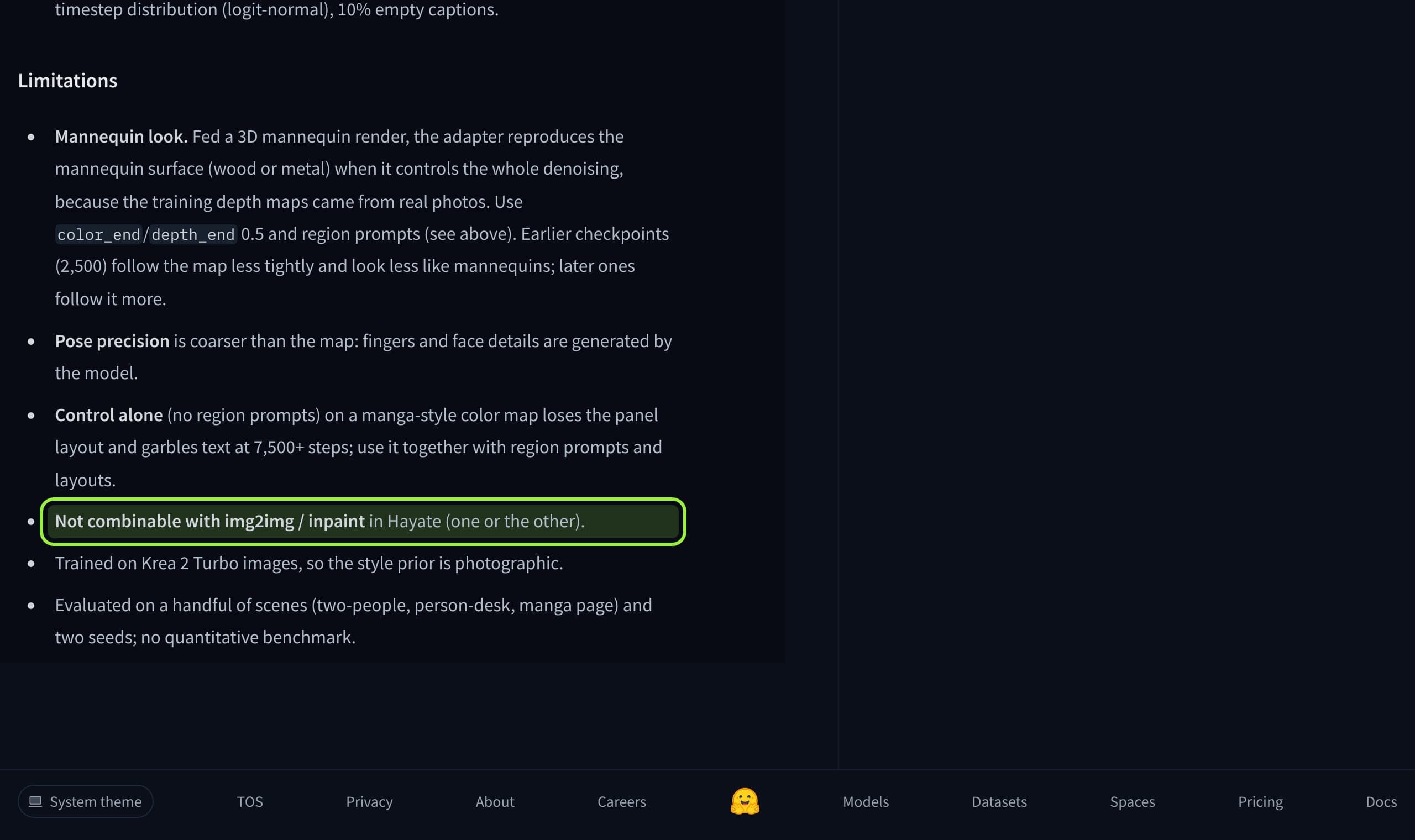
The Color and Depth Control node does not come from OpenMOSS. It is a node for an adapter published by one community author, and the author's card says what it does: you feed a flat color map whose colors are region IDs, black meaning unspecified, and a grayscale depth map with near surfaces white. It loads through a normal LoRA loader, and either map can be left out.
For a recurring character this is a way to hold a pose and a scene layout while the face comes from your references. The card is honest about the limits, and they matter: pose precision is coarser than the input map, fingers and faces are generated, and the style prior is photographic because the training images were Krea 2 Turbo output. It reports no quantitative benchmark, only a handful of scenes and two seeds.
The open MOSS-Image SFT stripe bug
The most useful thing in the MOSS threads this fortnight is a report of faint evenly spaced vertical color stripes on SFT outputs that Base does not show. The author found 48 cycles across the image width at any resolution, so the spacing is 21.3 px at 1024 wide, 18 px at 864 and 16 px at 768. By their analysis the stripes come from a few directions in the Base-to-SFT weight change, mostly in layers 24 to 41.
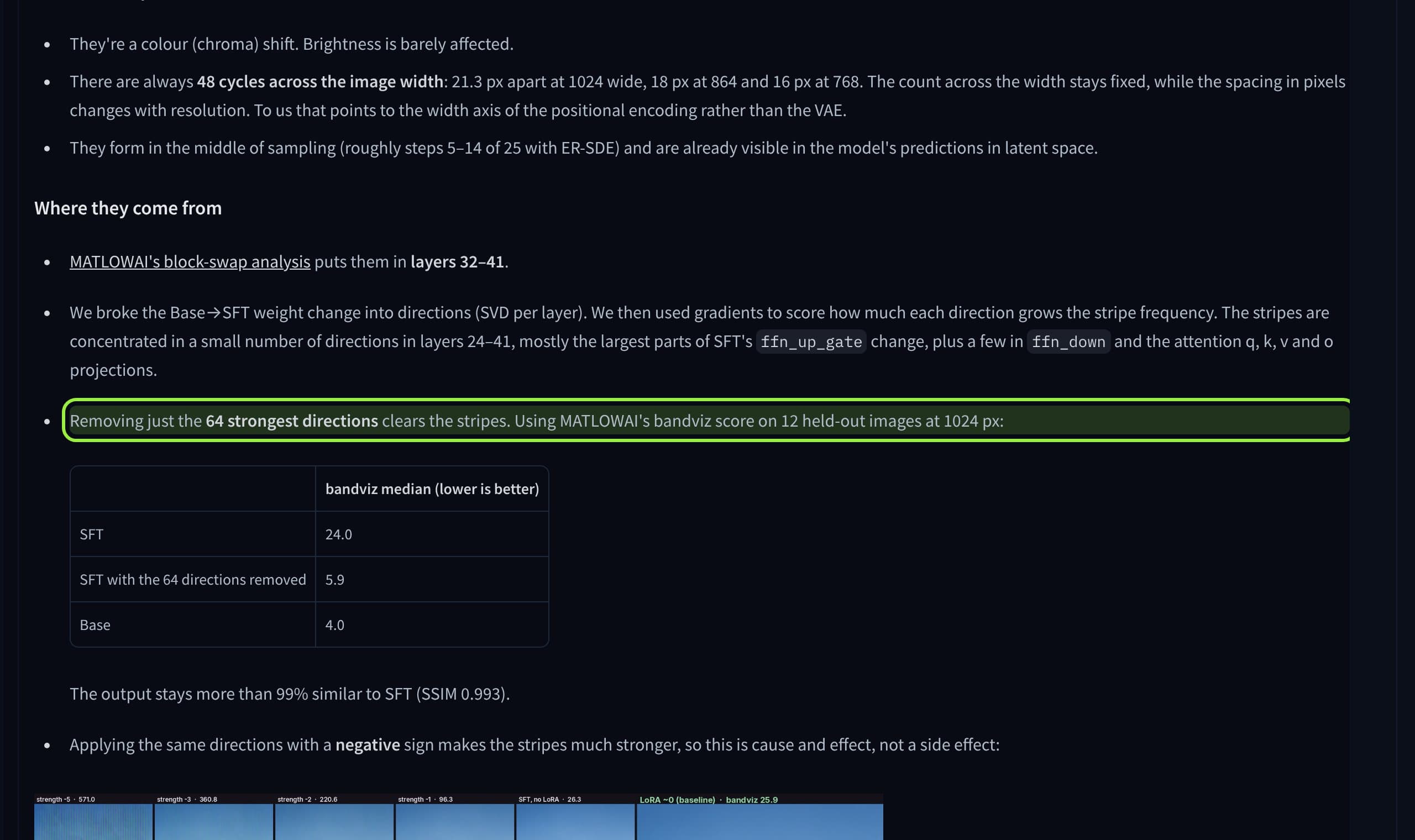
The proposed fix is a 1.9 MB LoRA that subtracts those directions. The author reports the output stays about 99% similar to SFT (SSIM 0.993), and that applying the same directions with a negative sign makes the stripes much worse, which they read as cause and effect. This is one person's measurement on 12 images. The thread had no replies when we read it, and the author asks whether OpenMOSS can release a fixed SFT checkpoint. We did not find an official answer, and the ComfyUI changelog does not mention it.
What creators are saying
A user reports faint evenly spaced vertical color stripes on SFT outputs that Base does not show, and offers a small LoRA as a workaround.
Another user says every SFT background comes out blurred and that no prompt produced a sharp one. There is no reply on the thread.
A hand-judged test of 8 scenes and 131 images finds short prompts garble text on menus, covers and comics, while expanded prompts make all four readable.
A user asks for an official Turbo model, which would match the 8-step checkpoints other models ship.
Partner nodes: faster to add, billed per run
Most new names in the node list this fortnight run on a provider's servers. v0.43.0 added Kling 4.0 for text, image, reference and video-edit generation with stereo audio, plus Meshy, PixVerse V6 Max, Bria guided nodes and an Ideogram SVG node. Earlier in the window came FLUX 3 Max and FLUX 3 Video with 2K and 4K options, Bria FIBO 2.0, HeyGen Voice and VEED lipsync, dubbing and background removal.
Partner nodes use Comfy Credits instead of your GPU, and ComfyUI's support pages say so. They are fine for a one-off hero shot or a lipsync pass. They are a poor base for a recurring character, because you cannot pin a version, train a LoRA on it or keep it if the price changes. We would use them as a fallback and keep the daily pipeline on weights you hold, as in best open video models for vertical reels.
What to do this week
- 1
Update, then read the template list
Move to 0.43.1 and open the new MOSS-Image and Fibo 2.0 templates before you build a graph by hand. The fixes for Gemma 4 31B attention and offload stream sync are in 0.43.0.
- 2
Test MOSS SFT on a smooth background
Render a plain wall or sky at 1024 wide and look for faint vertical bands. If you see them, compare with MOSS Base before you decide on the stripe LoRA.
- 3
Try control on one pose, not the pipeline
Run the adapter with a single depth map and region prompts, with the end percent the card recommends, and keep your character references in the loop. Treat the result as a test, since the card reports no benchmark.
- 4
Keep paid nodes out of the daily path
Use Kling 4.0 or FLUX 3 Max for one-offs. Keep the recurring face on a model whose weights are on your disk, and read the license before you monetize.
If you test these on your own install, Musetta can help: it runs on your own ComfyUI, installs the nodes and models a template is missing, and keeps each character's reference photos together so a new model is a test, not a rebuild. Our consistent character guide and missing nodes guide cover the manual route.
Questions
- What is the newest ComfyUI version?
- As of October 31, 2026 the newest release in the ComfyUI changelog is v0.43.1, dated October 28. It follows v0.43.0 on October 27 and v0.42.4 on October 22.
- What is new for MOSS-Image in ComfyUI 0.43?
- v0.43.0 added rope scaling, edit LoRA support, attention bias and image strength for editing, a MOSS merge node and lower peak memory. Color and Depth Control arrived in v0.42.2.
- Is the MOSS-Image color and depth control official?
- No. It is a node for a community adapter by a single author. OpenMOSS did not publish it, and the card reports evaluation on a handful of scenes and two seeds with no benchmark.
- Has OpenMOSS fixed the SFT stripe artifact?
- We found no official fix. A user thread offers a 1.9 MB LoRA workaround, and it had no replies when we read it. The ComfyUI changelog does not mention the issue.
- Do ComfyUI partner nodes cost money?
- Yes. Partner nodes such as Kling 4.0 run on the provider's servers and use Comfy Credits, per ComfyUI's support documentation, while local models run on your own GPU.
Sources
- 01ComfyUI changelog · Comfy Org, 2026-10-28
- 02ComfyUI v0.43.0 release notes · Comfy Org on GitHub, 2026-10-27
- 03MOSS-Image-SFT model card · OpenMOSS-Team on Hugging Face
- 04SFT vertical colour stripes: where they come from, plus a small fix · Hugging Face discussion
- 05Text rendering notes from 8 scenes / 131 images · Hugging Face discussion
- 06MOSS-Image color/depth control adapter · darask0 on Hugging Face
- 07MOSS-Image Color/Depth Control Arrives in ComfyUI Core · ComfyUI Wiki, 2026-10-27
- 08Partner Nodes: what are they · Comfy support
Researched and written by the Musetta editorial desk with AI assistance, from the sources above. Numbers come from those sources; nothing is benchmarked by us unless the article says so. Spotted an error? Tell us on Discord and we fix it.