In short
MiniMax H3 Image (open weights, 10 November 2026) is a 33.1B model that renders about 16 MP in 6 steps, with up to 16 reference images, in ComfyUI 0.45.0. One user ran the INT8 build on a 12 GB RTX 4070 SUPER with 96 GB RAM at about 41 s per 16 MP image. It follows prompts closely and gains detail at 16 MP, but testers say it keeps a reference face less well than H3 video. The license excludes the US, EU, UK and South Korea.
If your character already lives on MiniMax H3 video, MiniMax H3 Image is the obvious still model to try: same parent, same text encoder, released with open weights by MiniMax on 10 November 2026. It samples in 6 steps at about 16 megapixels, and the first public timings from a 12 GB card say it runs there too, at about 41 seconds per 16 MP picture with 96 GB of system RAM behind it.
The catch for a recurring face is likeness. Two days in, the most consistent complaint on both model pages is that it keeps a reference face less well than H3 video does. This review collects what the model card, the license, the Comfy docs and the first community tests say, read on 12 November 2026. We did not run it on our own GPU; every timing below is attributed to the person who measured it. For the head-to-head with Pruna's still model, see MiniMax H3 Image vs P-H3-Image.
The specs card
MiniMax H3 Image at a glance
- Released
- 10 November 2026 (license date); weights on Hugging Face, ComfyUI support in 0.45.0
- Diffusion model
- 33.1B parameters, 50 layers, the H3 architecture without the audio layers
- Sampling
- 6 steps, no classifier-free guidance, no negative prompt (the reference server rejects one)
- Output size
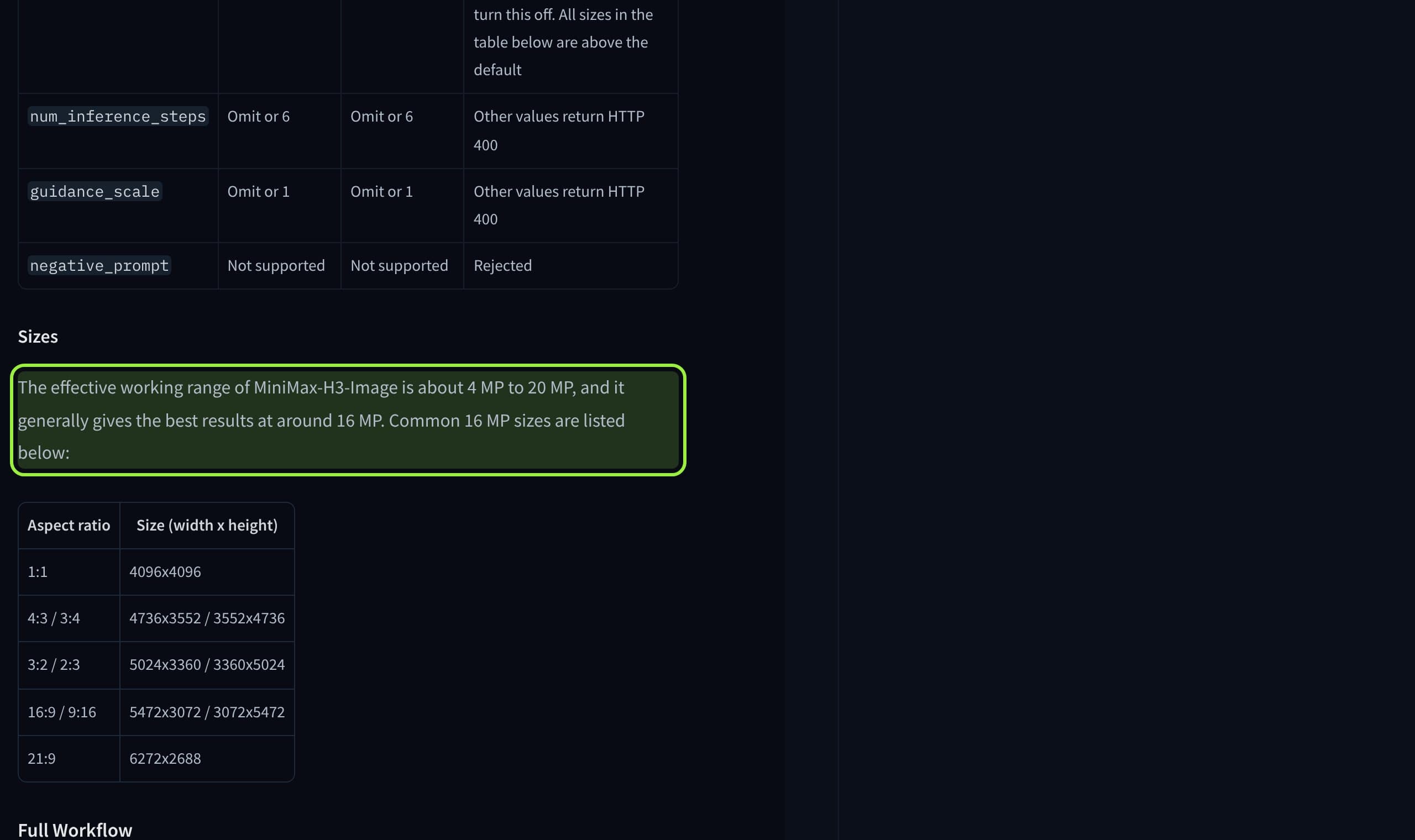
- About 16 MP at every ratio; working range about 4 to 20 MP; 9:16 is 3072x5472
- References
- Up to 16 input images, text-to-image and editing in one checkpoint
- Text encoder
- The full Qwen3-VL-32B from MiniMax H3 (66.7 GB original; 15.69 GB NVFP4 or 27.14 GB INT8 in ComfyUI)
- ComfyUI files
- DiT 12.55 GB W4A8, 20.98 GB INT8, 40.23 GB BF16; VAE 1.17 GB
- License
- MiniMax-H3-Image Community License: excludes the EU, UK, US and South Korea; authorization above 1 million USD revenue
Read the size row twice. Most open image models today render 1 to 4 MP and upscale. H3 Image is built to render the final pixels directly, and MiniMax's card says it is at its best near 16 MP, not at the template's default.
How it runs in ComfyUI
The Comfy docs ask for ComfyUI 0.45.0 or newer and template pack 0.11.104 or newer, and ship two templates: text to image and image edit. Both use euler, the simple scheduler, 6 steps and CFG 1. Since 10 November a community pDMD LoRA brings it to 2 steps; our ComfyUI 0.45 briefing has the details and the caveats. Four files go into the usual folders: the INT8 diffusion model in diffusion_models, the INT8 Qwen3-VL-32B encoder and the optional 7.34 GB Qwen3.5 9B prompt expander in text_encoders, and the 1.17 GB VAE in vae.
Reference images are encoded by the same text encoder as the prompt, per the model card. The expander is off by default in the text-to-image template and on in the edit template.
Two defaults change what you see. The text-to-image template opens at 4 MP so that small cards do not run out of memory, which puts it at the bottom of the model's range. And the template's prompt expander is a lighter 9B stand-in for MiniMax's own 17.9 GB expander, chosen so it fits beside the diffusion model on one GPU. If your pictures look flat, those two settings are the first place to look.
VRAM and speed: what the first 12 GB test measured
Neither MiniMax nor Comfy publishes a VRAM figure. The most detailed numbers so far come from one user's test on the Comfy-Org model page: an RTX 4070 SUPER with 12 GB of VRAM and 96 GB of system RAM, the INT8 diffusion model, the full INT8 text encoder, the FP16 VAE, the prompt expander removed, 6 steps at CFG 1. ComfyUI's dynamic VRAM streamed the 21 GB model from system memory, with about 41 GB of RAM in use.
The pattern is simple: four times the pixels took about four times as long, and a repeated prompt saves a few seconds because the encoder output is cached. The first image after a cold start took 23 seconds at 4 MP and 49 at 16 MP. So a 12 GB card is workable for stills if you have the system RAM; the 96 GB in that test is the number to copy, not the 12 GB. MiniMax's own claim of under 10 seconds for 4096 by 4096 names no hardware, so it does not compare with this.
What it is good and bad at for a recurring face
| Area | What is reported | Source |
|---|---|---|
| Prompt following | More precise than Qwen-Image 2.1 on the same scenes and seeds; places the asked-for objects | User test, Comfy-Org discussion 12 |
| Detail at 16 MP | Wrinkles, skin and single hair strands appear where 4 MP gave smooth skin | User test, Comfy-Org discussion 12 |
| Lighting | Flatter and brighter than Qwen-Image 2.1, less drama | User test, Comfy-Org discussion 12 |
| Older faces at 16 MP | Sometimes too crisp; stray hairs can render as bright lines | User test, Comfy-Org discussion 12 |
| Face likeness from references | Slightly worse than H3 video, which kept identity better | MiniMaxAI discussion 9 |
| Two people from two references | One of the two faces drifts from its source | Comfy-Org discussion 11 |
| Seed stability across sizes | The same seed gives a different composition at 16 MP than at 4 MP | User test, Comfy-Org discussion 12 |
For a character feed the last three rows are the ones that matter. A seed that does not carry across sizes means you should pick your production size first and only then hunt for seeds. And a likeness that trails the video model means H3 Image is not yet a drop-in replacement for the reference edit or LoRA routine that keeps your face stable. One tester reported that a couple of H3 video LoRAs worked on the image model, which, if it holds, is the cheapest route to a stable face: reuse the character LoRA you already trained.
The license, in four lines
- Where: the license covers the world except the European Union, the United Kingdom, the Republic of Korea and the United States.
- How much: written authorization from MiniMax once you and your affiliates pass 1 million USD of annualized revenue, or if you host it as a service for others.
- Outputs: they may not be used to improve another AI model, and may not be used or displayed outside the permitted territory.
- Disclosure: the acceptable use policy requires that machine-generated content posted publicly says so clearly.
How to set it up, in order
- 1
Update ComfyUI
0.45.0 or newer and template pack 0.11.104 or newer. An unknown node pack in the template means the build is old. Our H3 error guide covers the loader messages the shared encoder can throw.
- 2
Use the full text encoder
The 7.34 GB Qwen3.5 file is the prompt expander, not a lighter encoder. Load the Qwen3-VL-32B in INT8 or NVFP4; testers on both pages say quality drops with anything lighter.
- 3
Raise the size
Move the resolution selector from 4 MP toward 16 MP once a test image works. For 9:16 that is 3072x5472, per the card; see our 9:16 sizes per model.
- 4
Write the long prompt yourself or keep the expander
The model is tuned on detailed descriptions. With the expander off, write the scene in full; there is no negative prompt to fall back on.
- 5
Lock size, then seed
Pick the production size before you pick seeds, since the composition changes with resolution.
- 6
Test the face against your references
Ten renders, one reference set, the same seed list. Compare with your current model before you switch.
What creators are saying
Detail improved a lot over the video model and it now feels like a real image model, but character likeness is slightly worse than H3 video.
A second tester agreed the face likeness is usually off, but said a couple of H3 video LoRAs worked on the image model.
Fast, but the images look washed out.
ComplaintComfy-Org/MiniMax-H3-Image discussion on Hugging Face
Editing with two reference images of two people leaves one of the faces different from its source.
ComplaintComfy-Org/MiniMax-H3-Image discussion on Hugging Face
“Don't use the lightweight text encoder, or you won't get the official image quality.”
One user hit an unknown node pack in the template and was told the latest stable ComfyUI runs it out of the box.
QuestionComfy-Org/MiniMax-H3-Image discussion on Hugging Face
Verdict
MiniMax H3 Image is the most capable still model in the H3 family and a poor first choice for keeping one face, for now. It is worth installing if you already have the H3 text encoder on disk, since the test then costs one 21 GB file, and if you need large, detailed stills with strict prompt following: product shots, scenes, posters. Run it at 16 MP before you judge it; the 4 MP default undersells it, and the first 12 GB test shows 16 MP is reachable on a mid-range card with enough system RAM.
For a recurring character, keep your current routine and run H3 Image beside it. Every report so far puts its likeness behind H3 video, and the same seed moves between sizes. If you are in the US, EU, UK or South Korea, the license does not cover you at all, and MOSS Image under Apache-2.0 remains the open choice. Weigh the 1 million USD line before an agency or client workflow is built on it.
If you want to try it without rebuilding a graph, Musetta runs on your own ComfyUI, installs the nodes and models a workflow is missing, and keeps each character's reference photos, so the face test above is one request. See how it compares with plain ComfyUI.
Questions
- How much VRAM does MiniMax H3 Image need?
- MiniMax and Comfy publish no figure. One user ran the INT8 model with the full INT8 text encoder on a 12 GB RTX 4070 SUPER, with ComfyUI streaming the model from 96 GB of system RAM; about 41 GB of RAM was in use. Plan on plenty of system RAM if your card is small. For smaller files, see which GGUF quant fits 8, 12 and 16 GB.
- What resolution should I use?
- The model card gives a working range of about 4 to 20 MP and says results are best around 16 MP, for example 4096x4096 or 3072x5472 for 9:16. The Comfy text-to-image template opens at 4 MP to protect small cards, so raise it once a test works.
- Can I use the Qwen3.5 9B file as the text encoder?
- No. It is the optional prompt expander. The model needs the Qwen3-VL-32B text encoder from MiniMax H3, in INT8 (27.14 GB) or NVFP4 (15.69 GB) for ComfyUI.
- Does MiniMax H3 Image keep the same face?
- Early testers on both Hugging Face pages report that face likeness from references is slightly worse than MiniMax H3 video, and that with two people one face drifts. Test it against your own references before switching a character feed.
- Can I use it commercially?
- Only outside the EU, UK, US and South Korea, and with written authorization from MiniMax once you and your affiliates pass 1 million USD of annualized revenue or host it for others. Outputs may not train other AI models.
Sources
- 01MiniMax-H3-Image model card · MiniMax on Hugging Face, 2026-11-12
- 02MiniMax-H3-Image Community License Agreement · MiniMax, 2026-11-10
- 03MiniMax-H3-Image: 16 MP text to image and image editing in ComfyUI · Comfy docs
- 04MiniMax H3-Image: Bringing 4K Image Generation into the 10-Second Era · MiniMax, 2026-11-11
- 05Comfy-Org/MiniMax-H3-Image file listing · Comfy-Org on Hugging Face
- 0612 GB card numbers: int8 DiT + full 32B text encoder (RTX 4070 SUPER) · Hugging Face discussion, 2026-11-11
- 07Test, comparison with the original MiniMax H3 · Hugging Face discussion, 2026-11-11
- 08face consistency · Hugging Face discussion, 2026-11-11
- 09MiniMax releases H3-Image weights, says model can generate 4K images in under 10 seconds · TechNode, 2026-11-11
- 10ComfyUI releases · GitHub
Researched and written by the Musetta editorial desk with AI assistance, from the sources above. Numbers come from those sources; nothing is benchmarked by us unless the article says so. Spotted an error? Tell us on Discord and we fix it.