In short
A 12 GB card can train a MiniMax H3 character LoRA with ai-toolkit: 31 close-up faces at 512 px, rank and alpha 16, 1,000 steps at 1e-4, about 6 to 7 hours on an RTX 4070. Set num_frames to 1 and auto_frame_count to false, load it with LoraLoaderModelOnly, and choose the checkpoint by comparing faces. The H3 license excludes the US, EU, UK and South Korea.
A character LoRA is the difference between a face that is yours and a face the model improvised. For MiniMax H3 the first public recipe for a 12 GB card reports roughly 6 to 7 hours per 1,000 steps on an RTX 4070, with about 11.7 GB of the card in use, and its author's first attempt failed because the faces in the training images were too small.
This guide turns that recipe, two hosted-trainer guides and the model's license into one run order. The settings come from a hands-on note.com guide published on 7 August 2026, the ai-toolkit repository and the Comfy-Org file listing. Nothing here is a render of ours: we did not train this LoRA, so every number is attributed to the person who measured it.
Check the license before you train anything
H3's community license is dated 2 August 2026 and grants rights "solely within the Applicable Territory", which it defines as worldwide excluding the European Union, the United Kingdom, the Republic of Korea and the United States. Section V.4 bars using, modifying or distributing the works or their outputs outside it. Training a LoRA is modifying how the model behaves, so the territory question comes before the dataset question.
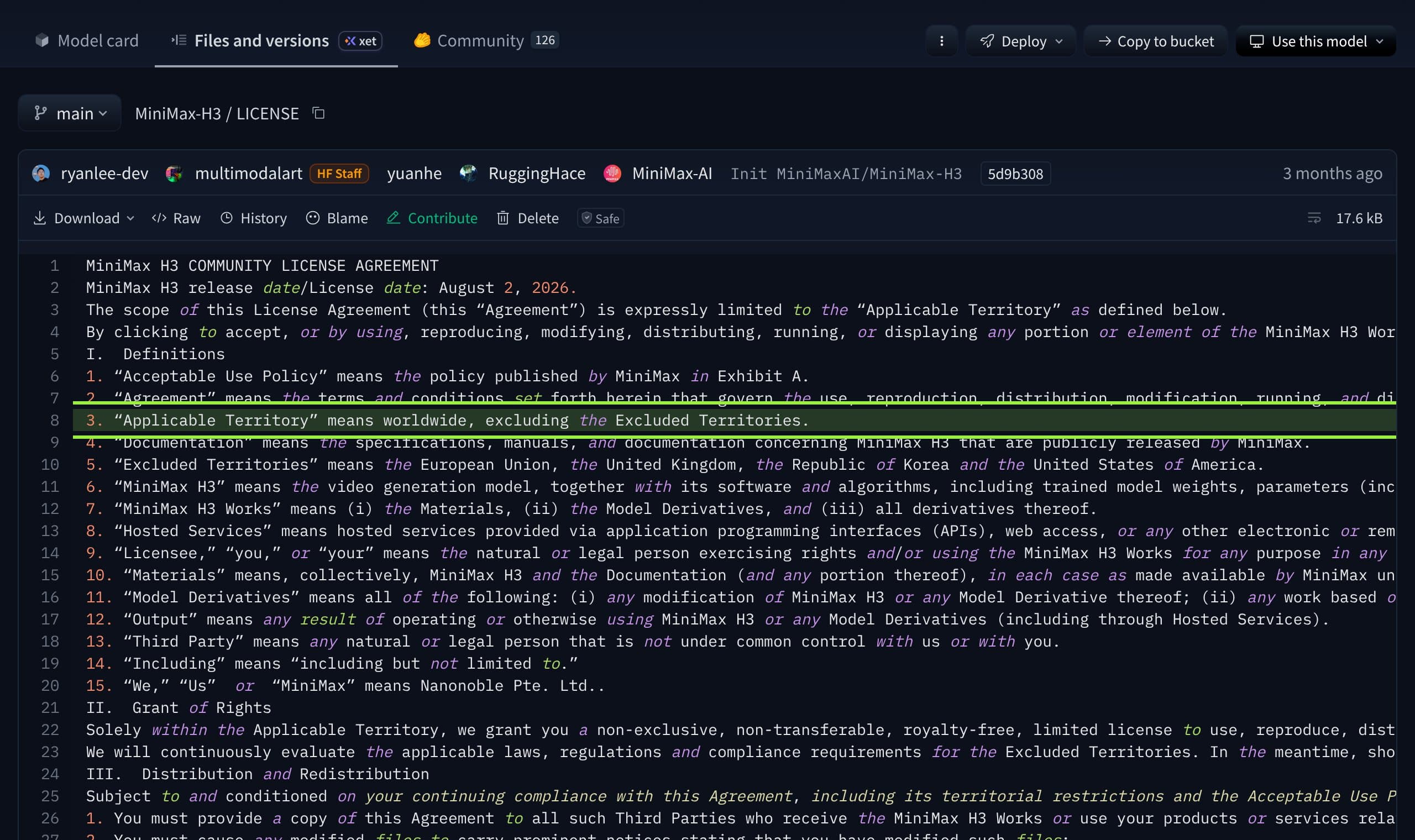
Two more clauses touch a LoRA. The definition of Model Derivatives includes "any modification of MiniMax H3", and the text never names LoRA, so we cannot tell you from the file alone whether an adapter counts. Section III.2 requires modified files to carry prominent notices, and section IV.2 asks commercial products to display "MiniMax H3". Read the file, and ask the licensor if your account is commercial.
What you need on disk and in memory
The note.com author points ai-toolkit at the existing ComfyUI model folders through the MODELS_PATH environment variable instead of copying files, and reports that the full set is over 40 GB. That matches the Hub listing, which we summed: the pruned int8 diffusion model (20.97 GB), the NVFP4 text encoder (15.69 GB), the int8 video VAE (2.81 GB) and the audio VAE (0.61 GB) come to 40.08 GB.
What the 12 GB run used, as measured by its author
- GPU
- RTX 4070, 12 GB, about 11.7 GB dedicated in use
- Shared GPU memory
- 10 to 15 GB
- System RAM
- 32 to 37 GB
- Time
- 6 to 7 hours per 1,000-step run
- Files on disk
- 40.08 GB (our sum of the Comfy-Org files above)
- Trainer
- ai-toolkit, MIT license, arch minimax_h3
Treat the RAM line as the real minimum. Much of the load was offloaded to system memory, and Seedance's guide calls 24 GB the practical starting point for local training, with 12 GB possible only through heavy quantization, offloading and short clips. That vendor sells a hosted alternative, so weigh the advice accordingly. The same author's guess that a 12 GB RTX 3060 could also train, only slower, is untested.
Build the dataset: faces, not full bodies
The 12 GB recipe is a still-image LoRA, trained on single frames rather than clips. Its author tried two datasets. The first had 32 full-body and mixed images and failed: at 512 pixels the face was too small for the model to learn the likeness. The second had 31 close-up face images, mostly on white backgrounds, and worked.
- Use 25 to 35 close-ups of one face. The working set was 31; the failed one had 32 mixed compositions.
- Keep the background plain so the model learns the person and not the room.
- Caption with a trigger word and a short tag only. The author used just the trigger word plus
1girl, to keep the character's details inside the trigger. - Set resolution to 512, and to 384 if you hit a CUDA out of memory error.
- Use the same person in every image. Near-duplicates and watermarks teach the adapter your mistakes.
Hosted trainers want something different. Imagera's guide says its trainer accepts video only, 10 to 50 clips, 15 to 30 recommended, each about 3 seconds or more at exactly 24 fps, and rejects zips that mix images and clips. A still-image LoRA and a video LoRA are different jobs, so pick one before you collect data.
The ai-toolkit settings that matter
Most of the config is ordinary flow-match training. Five lines are specific to H3 on a small card, and getting them wrong is how a run fails or wastes a night.
| Setting | Value | Why it matters |
|---|---|---|
arch / model | minimax_h3, Comfy-Org/MiniMax-H3 | The trainer loads H3 from the Comfy-Org repo |
qtype / qtype_te | convrot8 / nvfp4 | Quantizes the diffusion model and the text encoder to fit 12 GB |
low_vram, partition | true, fl2va | Offloads to system RAM; trains the first and last frame mode |
num_frames | 1 | A still-image LoRA |
auto_frame_count | false | With true, the log says Found 0 videos and an image set fails |
do_i2v, do_audio | false, false | No video or audio conditioning for stills |
| Rank / alpha | 16 / 16 | Same as both hosted guides' starter value |
| Steps, learning rate | 1,000, 1e-4 | The author saw likeness near 500 steps and preferred 1,000 |
| Optimizer, batch | adamw8bit, 1 | Weight decay 1e-4, bf16, gradient checkpointing on |
train_text_encoder | false | Only the diffusion model is trained, so load the LoRA on the model side |
disable_sampling | true | No sample images during the run, which saves memory and time |
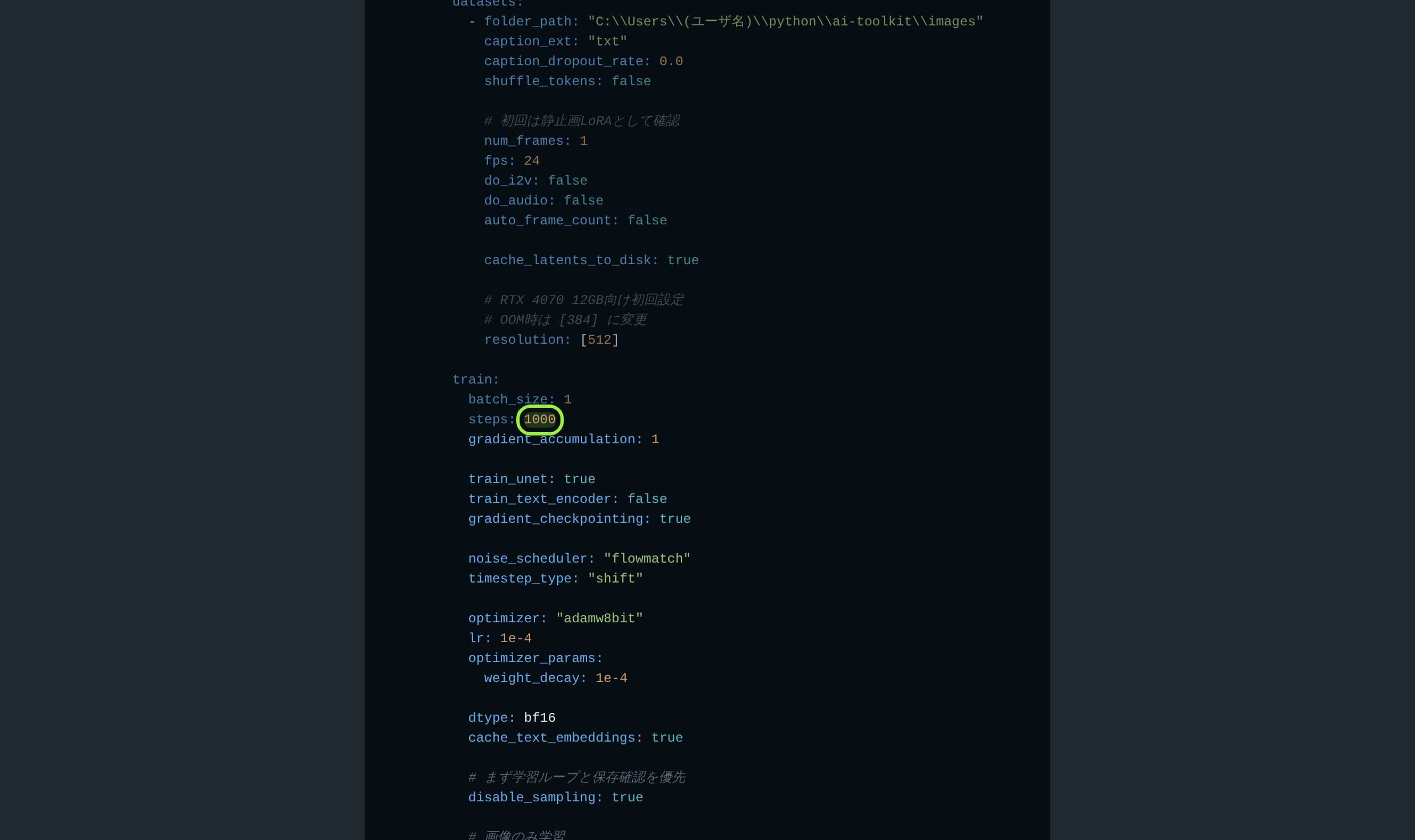
Hosted trainers use higher values. Seedance's table lists 16/16 at 2e-4 for 1,000 to 2,500 steps for a character, and notes the sampler is guidance-distilled, so you should leave guidance at 1 and not overwrite H3's internal flow-match shifts with an image-model preset. The 12 GB run chose 1e-4 and a shorter schedule, which is the conservative end. It is one run, not a benchmark.
Run it, and rerun it safely
- 1
Install inside the ai-toolkit virtual environment
The author warns against installing dependencies globally. Use python 3.10 or newer, 3.12 recommended, per the repository README.
- 2
Point MODELS_PATH at your ComfyUI models
This avoids a second 40 GB copy and keeps the two tools using identical files.
- 3
Test with a still-image LoRA first
Set num_frames to 1 and auto_frame_count to false. A video LoRA is, in that author's judgment, probably out of reach on 12 GB.
- 4
Change the output name before every rerun
If the output file already exists, the run is skipped. The author hit this on a re-run.
- 5
Save a checkpoint every 100 steps and keep them all
The author saved every 100. You choose the winner by comparing them, not by the last file.
Use the LoRA in ComfyUI
Put the file in models/loras, the author used a minimax-h3 subfolder, and load it with a LoraLoaderModelOnly node after the H3 diffusion model. Model only, because the text encoder was never trained. Seedance adds two rules worth following: match the adapter to the H3 mode it was trained for, and start at strength 0.7 to 1.0 on held-out prompts at the same seed.
If you stack the Turbo LoRA from our workflow breakdown with a character LoRA, lower the character strength. Imagera reports that adapters only load in the mode they were trained for, that up to three can run at once, that it starts at about 0.6 to 0.8, and that two adapters at full strength tend to fight. That is a hosted-trainer observation, so test it on your own graph.
The text encoder path is untouched, because the LoRA did not train it.
Pick the checkpoint, not the last file
The 12 GB author saw the likeness appear around 500 steps, thought 800 was good and preferred 1,000. Seedance's advice is the same in principle: stop where validation identity peaks, and if every prompt gives the same composition, roll back or diversify the data. Fix three prompts and one seed, render each saved checkpoint, and compare faces side by side before you pick.
What creators are saying
What creators are saying
The first still-image LoRA was trained on full-body images and the face was too small at 512 pixels to learn. Close-ups on plain backgrounds fixed it.
With auto frame count left on, training reported finding no videos and stopped. Setting it to false made a still-image dataset work.
Complaintnote.com, 12 GB guide
One run takes six to seven hours on a 12 GB RTX 4070, with much of the work offloaded to system RAM.
Complaintnote.com, 12 GB guide
In a Mac comparison of H3 and LTX, the tester found H3 held the likeness of a character in a profile turn better than LTX did.
These four come from two public posts. Reddit refused our network, so none of them are forum threads, and four paraphrased lines is a thin sample. Treat them as one person's measurements, not a consensus.
When to train, and when to skip it
Train a LoRA when the character will appear in many clips over weeks, you have 25 or more clean close-ups, and you can spend a night of GPU time. Skip it when you need one video: H3's reference mode takes up to nine images, and the LoRA against reference edit comparison shows why a LoRA is not always the faster route to a stable face. For other trainers, see our LoRA training tools ranking.
H3 character LoRA cheat sheet
- Dataset
- 25 to 35 close-up faces, plain background, 512 px
- Caption
- Trigger word plus one short tag
- Rank, alpha
- 16 and 16
- Steps, rate
- 1,000 at 1e-4 (12 GB run); 1,000 to 2,500 at 2e-4 (Seedance)
- Frames
- num_frames 1, auto_frame_count false for stills
- ComfyUI
- LoraLoaderModelOnly, strength 0.7 to 1.0, test at one seed
- Checkpoint
- Save every 100 steps, pick by comparing faces
- License
- Applicable Territory excludes the EU, UK, South Korea and USA
Verdict
A 12 GB card can train an H3 character LoRA, but it is a night of work, 32 GB or more of system RAM and a dataset of close-up faces. The recipe is one author's single successful run, so copy the structure and the five H3-specific settings, not the exact step count, and let checkpoints decide.
Before any of that, read the territory clause. For a creator in the US, the EU, the UK or South Korea the license, not the VRAM, is the real constraint, as our H3 against LTX comparison found. Musetta runs on your own ComfyUI and keeps each character's reference photos, so a trained adapter and its references sit together; it does not train the LoRA or change the license.
Questions
- Can I train a MiniMax H3 LoRA on 12 GB of VRAM?
- One public guide did, on an RTX 4070 with 12 GB, using a still-image dataset, quantized weights and offloading to system RAM. It used about 11.7 GB of VRAM and 32 to 37 GB of RAM and took 6 to 7 hours per 1,000 steps. Video LoRAs probably need more.
- How many images does an H3 character LoRA need?
- The working 12 GB run used 31 close-up face images. Hosted video trainers ask for 10 to 50 clips, with 15 to 30 recommended by one of them. Quality and a plain background matter more than raw count.
- What rank and learning rate should I use?
- The 12 GB run used rank 16, alpha 16 and 1e-4 for 1,000 steps. Seedance's hosted guide lists 16/16 at 2e-4 for 1,000 to 2,500 steps. Start at the first and compare checkpoints.
- Which ComfyUI node loads the LoRA?
- LoraLoaderModelOnly after the H3 diffusion model, because the text encoder was not trained. Start at strength 0.7 to 1.0 and match the H3 mode the adapter was trained for.
- Does the H3 license allow me to train and use a LoRA?
- Only inside the Applicable Territory, which excludes the EU, the UK, South Korea and the USA. The license does not name LoRA, but it covers modification and outputs. Read it and ask MiniMax if unsure.
Sources
- 01Character LoRA for MiniMax H3 on 12 GB with ai-toolkit · note.com, 2026-08-07
- 02MiniMax H3 community license · Hugging Face, MiniMaxAI, 2026-08-02
- 03Comfy-Org/MiniMax-H3 file listing · Hugging Face, Comfy-Org, 2026-11-09
- 04ai-toolkit repository · GitHub, Ostris, 2026-11-09
- 05MiniMax H3 LoRA training guide · Seedance, 2026-08-18
- 06MiniMax H3 LoRA training: clips, steps, modes · Imagera, 2026-09-29
- 07Mac test of H3 against LTX 2.5 · note.com
Researched and written by the Musetta editorial desk with AI assistance, from the sources above. Numbers come from those sources; nothing is benchmarked by us unless the article says so. Spotted an error? Tell us on Discord and we fix it.