In short
MiniMax H3 is the strongest open video model a creator can load in ComfyUI right now: 33B parameters, 4 to 15 second clips at 24 fps with stereo sound and dialogue in 11 languages, and a reference mode that takes up to nine images of your character. It runs on 12 and 16 GB cards with offloading, but long clips fail at decode and the audio needs care. The catch is the license: it excludes the EU, the UK, the US and South Korea, outputs included.
If your character only posts stills, the open-weight world just moved past you. MiniMax H3 makes clips with her voice, her lip movement and the room sound in one pass, and this week its turbo LoRAs and ComfyUI workflows sit near the top of both Civitai and Hugging Face downloads. One fact decides whether any of that matters to you, and it is not in the specs: the license does not cover use, or use of the outputs, in the European Union, the United Kingdom, the United States or South Korea.
This review covers what the model is, what it does well and badly for a recurring face, what it takes to run in ComfyUI, the failures people are filing, and who can use it for a monetized account. Everything below is checked against the model card, the license text, the ComfyUI release notes and the open issues, which are linked where they are used.
What MiniMax H3 is
MiniMax announced H3 (marketed as Hailuo 3.0) as an API product at the end of July and published the weights on Hugging Face in early August. The license is dated August 2, 2026, and ComfyUI added core support in version 0.30.0 on August 3, so it has had two months of community tuning.
MiniMax H3 cheat sheet
- Architecture
- 33B dense H3-Omni Transformer, one stream for video and audio
- Open variants
- H3-Base-FL2VA (text or first/last frame to video), H3-Base-Ref2VA (references to video)
- Not in the open release
- H3-Regenerate-2K upscaler (the 2K you see in API demos)
- Resolution
- Shorter side 768 px by default; 9:16, 1:1, 16:9 and more
- Length
- 4 to 15 seconds at 24 fps
- Audio
- Stereo, 32 kHz, dialogue in 11 languages including English, German, French, Spanish, Japanese
- Ref2VA inputs
- Up to 9 images, 3 video clips and 3 audio clips, 15 s of audio and video in total, 12 files
- ComfyUI
- Core support since 0.30.0 (Aug 3); official T2V and R2V templates
- License
- MiniMax H3 Community License; excludes EU, UK, US, Republic of Korea
- Commercial
- Free under USD 20M yearly revenue, with "MiniMax H3" shown in your product's UI
Two lines in that card matter most for a character feed. 9:16 at 768 px is a native vertical reel without cropping. And Ref2VA is the first open mode that takes a set of reference photos, a voice clip and a prompt and returns her talking, which until now meant three tools: an image model, a video model and a lip-sync pass. Our Wan 2.2 reels guide still describes that three-step chain.
What it does well and badly for a recurring face
- Good: identity from references. Up to nine images of her go in, so the face is anchored by a set, the same idea as a consistent character set for stills.
- Good: sound in the same pass. Room tone, music and speech are generated with the frames, so lips and audio come from one model instead of two.
- Good: vertical by default. 9:16 is a listed aspect ratio, not a crop.
- Bad: voice references are unreliable. Users report the reference clip leaking into the output and silent moments turning into garbled speech (details below).
- Bad: 768p locally. The 2K regenerate model is not in the open release, so plan an upscale step for anything larger than a phone screen.
- Bad: long clips on 16 GB. Sampling finishes and decoding fails past roughly 209 frames, about 8.7 seconds at 24 fps.
Running it in ComfyUI
Update ComfyUI first. H3 nodes do not exist before 0.30.0, and later releases matter: 0.38.0 added Fun-Controlnet-Union 2.0 for H3 and blended VAE tiles against their neighbours, and 0.39.0 on October 5 added a light H3 VAE and freed embedding memory earlier. If a shared workflow opens with red nodes, the missing nodes guide covers the fix.
Based on the official R2V template linked from the model card, with the decode workaround from ComfyUI issue 15453.

On hardware, nobody has published an official matrix. Comfy's day-zero announcement said int8 weights plus dynamic VRAM offloading run H3 on a card like the RTX 3060 12 GB; treat that as possible, not comfortable. The bug reports below come from 16 GB cards running the official templates, which is the realistic floor for regular use. Plenty of system RAM matters as much as VRAM, because offloaded weights live there. If your card is smaller, renting a GPU by the hour is cheaper than a week of failed decodes.
| Setup | What to expect | What to set |
|---|---|---|
| 12 GB (RTX 3060 class) | Possible with int8 and offloading, per Comfy; slow | Short clips, low preview resolution first |
| 16 GB (RTX 5070 Ti, RTX Pro 2000) | Official templates run; decode fails above about 209 frames | Keep clips under about 8 s, or unload models before decode |
| 16 GB on Windows, Blackwell | Access violation in VAE decode with default flags | Launch with --disable-async-offload and --disable-pinned-memory |
| 24 GB and up | Fewer offload stalls; long clips still stress decode | Same decode workaround for 15 s clips |
The failures people are filing
Three open issues cover most of what goes wrong. On 16 GB, issue 15453 shows long clips completing sampling and then running out of memory at decode, with the tiled-decode fallback doing nothing for this VAE; it failed three times out of three at 243 frames. The reporter's workaround is a node that unloads all models between the sampler and the decode, and a second user measured free VRAM rising from about 3.2 GB to 11.3 GB with a similar call.
On Windows with an RTX 5070 Ti, issue 15337 reports the whole ComfyUI process dying with an access violation during video decode. It completed only with both --disable-async-offload and --disable-pinned-memory set. Audio is the third: frontend issue 15040 reports harsh, distorted Ref2VA audio on every setup the reporter tried, with no error in the console. Two related fixes, one for EasyCache audio corruption and one for audio VAE offload, are merged, so update before you judge the sound.
What creators are saying
Following the guide, only direct pass-through of the reference audio worked; otherwise output started with gibberish or replayed the reference file itself.
Trimming the reference audio to roughly the length of the spoken line stopped the voice from carrying on into speech nobody asked for.
One user blamed the turbo LoRAs, trained on the first/last-frame model, for garbled audio; another got garbled output half the time without any LoRA.
On a 16 GB card, clips past about 209 frames finish sampling and then fail at decode, and the tiled retry does not help.
ComplaintComfyUI GitHub issue 15453
Distorted audio reproduced every time on the official Ref2VA workflow, on both Desktop 0.31.0 and Portable 0.31.1, with nothing in the console.
ComplaintComfyUI frontend GitHub issue 15040
The prompt advice from that thread is worth keeping: write the line as "says exactly this" followed by the words, end it with a period so speech stops cleanly, and describe the background sound so silent stretches have something to fill them that is not mumbling.
The license catch
Most open-weight licenses argue about revenue. This one draws a map. The MiniMax H3 Community License grants rights in an "Applicable Territory" defined as worldwide minus the European Union, the United Kingdom, the Republic of Korea and the United States, and it says use of outputs outside that territory is not authorized by the agreement. So it is not only about where the GPU sits: a creator in Berlin posting H3 clips is outside the grant either way.
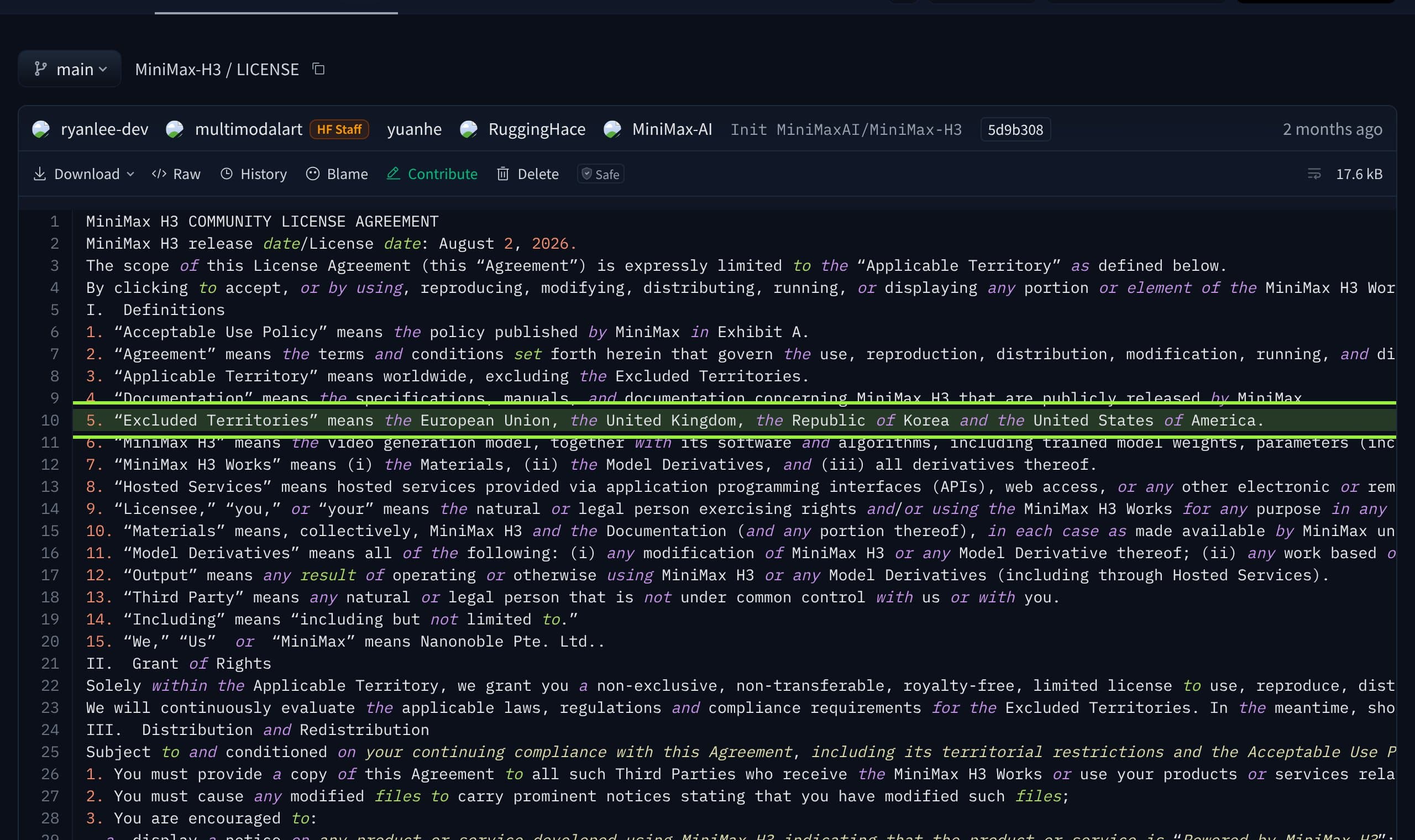
Two clauses from the acceptable use policy apply to every character account anywhere: no impersonating a real person without consent, and public machine-generated content must be clearly disclosed as such. Neither is new for an AI influencer, but here they are license terms, not only platform rules.
Verdict: who should use it
Outside the excluded regions, and with 16 GB or more: yes. For talking reels it is the most capable open option in ComfyUI today, and Ref2VA replaces a three-tool chain with one graph. Keep clips under about eight seconds on 16 GB, unload models before decode, trim voice references, and preview at low resolution before the final render.
Inside the EU, UK, US or South Korea: not for a monetized feed unless MiniMax grants you a license. Use a model whose license covers you: Wan 2.2 with a separate audio pass, or Kandinsky 6.0 with sound, which our October briefing covered. Check each license yourself; quality rankings mean nothing for a model you cannot post. For all four open video models side by side, see the vertical reels ranking.
Musetta runs on your own ComfyUI and keeps your character's references in one place, so swapping the video model under her when a license or a release changes is a setting, not a rebuild. See how it works. If a render crashes with an out-of-memory error while VRAM is free, see the Dynamic VRAM fix order.
Questions
- Can I run MiniMax H3 on a 12 GB GPU?
- Comfy's day-zero announcement said int8 weights with dynamic VRAM offloading run it on a card like the RTX 3060 12 GB. Expect it to be slow and keep clips short; 16 GB is the realistic floor for regular use, with plenty of system RAM.
- Is MiniMax H3 open source?
- The weights are open, but the MiniMax H3 Community License is a custom license, not an open source one. It excludes the EU, UK, US and South Korea and requires written permission above USD 20 million in yearly revenue.
- Can I use MiniMax H3 for a monetized AI influencer in Europe?
- Not under the community license: the EU and UK are excluded territories and the license does not authorize use of outputs there. You can contact MiniMax for a separate license.
- Why does my MiniMax H3 clip fail at the end of a long render?
- On 16 GB cards the video VAE decode runs out of memory past about 209 frames, and tiled decode does not rescue it. Unload models before the decode node or keep clips under about eight seconds.
- Why is MiniMax H3 audio distorted or garbled?
- Update ComfyUI first, since fixes for EasyCache audio corruption and audio VAE offload are merged. Then trim the voice reference to the length of the line, write the exact words, and describe background sound.
Sources
- 01MiniMax-H3 model card · MiniMax, Hugging Face
- 02MiniMax H3 Community License Agreement · MiniMax, Hugging Face, 2026-08-02
- 03ComfyUI releases (0.30.0, 0.38.0, 0.39.0) · Comfy-Org, GitHub, 2026-10-05
- 04MiniMax H3 video VAE: long-clip decode OOMs are unrecoverable (issue 15453) · ComfyUI, GitHub, 2026-08-09
- 05MiniMax H3 video VAE decode access violation on RTX 5070 Ti (issue 15337) · ComfyUI, GitHub, 2026-08-06
- 06Distorted audio in MiniMax H3 video output (issue 15040) · ComfyUI frontend, GitHub, 2026-08-11
- 07How to define an audio reference for Subject 1, Ref2V (discussion 64) · Hugging Face discussions, 2026-08-08
- 08MiniMax H3 day-0 support in ComfyUI · Comfy Org blog
Researched and written by the Musetta editorial desk with AI assistance, from the sources above. Numbers come from those sources; nothing is benchmarked by us unless the article says so. Spotted an error? Tell us on Discord and we fix it.