In short
Comfy's official MiniMax H3 templates have a turbo_mode switch that loads an 8-step distilled LoRA and cuts the default 20 steps to 8. One tester measured 3:23 against 1:21 for a 5 second clip on an RTX 5090. Use it for tests and face-large batches, then render the approved clip at 20 to 25 steps. The base license still applies.
A MiniMax H3 clip of your character at 20 steps took 3 minutes 23 seconds on an RTX 5090 in one tester's run, and 1 minute 21 seconds with the Turbo LoRA at 8 steps (Kombitz test). The speed-up comes from one switch in Comfy's own template, turbo_mode, and this breakdown follows the graph node by node so you know what that switch changes, what it leaves alone, and where a character's face can still go wrong.
It is a workflow breakdown, not a model review: our MiniMax H3 review covers specs, VRAM and the license, and the LTX-2.5 image to video recipe covers the other open video model creators are downloading. Every file name and default below was read on Comfy's native workflow page or the model pages linked where they are used.
What the Turbo switch actually is
Turbo is not a separate model. It is a distilled LoRA, a small add-on trained so the base model reaches a usable result in fewer sampling steps. LightX2V published the 8-step v1.0 file on August 11 after a v0.1 preview on August 7, and Comfy's template loads it for you when turbo_mode is on. The LightX2V model repository, lightx2v/Minimax-h3-Turbo, lists the Apache 2.0 license, MiniMaxAI/MiniMax-H3 as its base and 1,492,255 downloads last month, which is why it sits at the top of Hugging Face's image to video list this week.
The official MiniMax H3 templates at a glance
- Templates
- Text to Video (T2V), Image to Video (I2V, optional first and last frame), Reference to Video (R2V)
- Models
- One FL2VA model for T2V and I2V, a different ref2va model for R2V (files in the table below)
- Text encoder
- Qwen3-VL 32B, quantized
- VAEs
- One for video, one for audio
- Default steps
- 20; Comfy suggests raising to about 25 for better motion
- Canvas
- 768 px short edge, 1344x768 at 16:9, rounded to a multiple of 32
- Duration
- Snaps to a 17k+5 frame grid at 24 fps
| Folder | File |
|---|---|
| models/diffusion_models/ | minimax_h3_fl2va_pruned_int8_convrot.safetensors (T2V, I2V) |
| models/diffusion_models/ | minimax_h3_ref2va_pruned_int8_convrot.safetensors (R2V) |
| models/text_encoders/ | qwen3vl_32b_minimax_h3_nvfp4_awq.safetensors |
| models/vae/ | minimax_h3_video_vae_int8_convrot.safetensors, minimax_h3_audio_vae_fp32.safetensors |
| models/loras/ | minimax_h3_fl2v_turbo_8step_v1.0_comfyui_bf16.safetensors (turbo_mode) |
The graph, node by node
A simplified map from the files and inputs on Comfy's page. The real template has more nodes, and the LoRA is applied inside the MiniMax H3 node when turbo_mode is on.
- 1
Inputs: still, prompt, duration
The
first_frameandlast_frameinputs are optional and the model generates the motion between them. The prompt describes the shots, the motion and the audio (dialogue, effects, music) in one block. Duration snaps to the 17k+5 grid, so a 5 second ask lands on the nearest valid length. - 2
Text encoder and model
The Qwen3-VL 32B encoder turns the prompt into conditioning; the FL2VA model is the one that does the denoising. R2V loads the ref2va file instead, so a graph copied from I2V will not accept references.
- 3
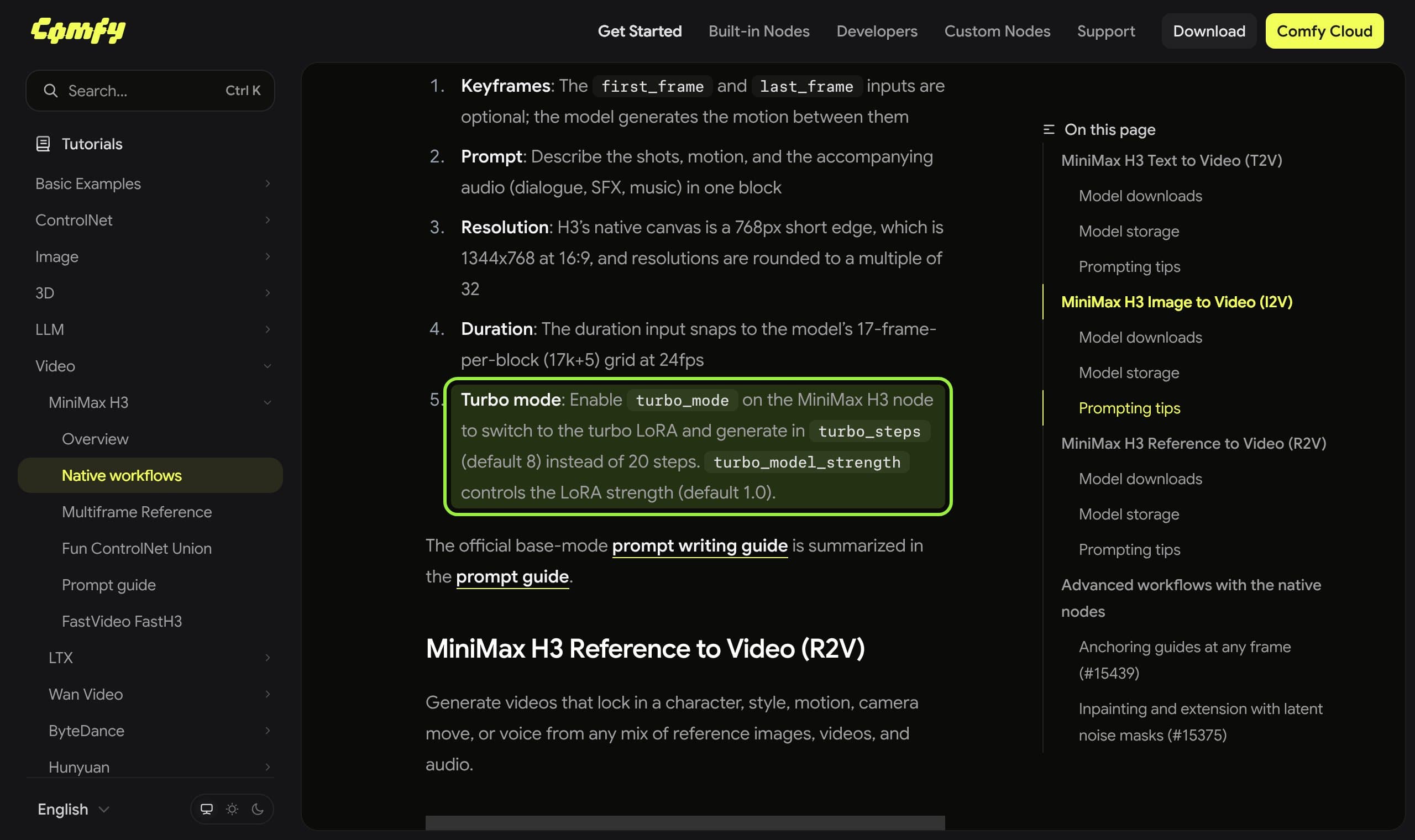
`turbo_mode` on the MiniMax H3 node
Switching it on loads the 8-step LoRA, sets
turbo_steps(default 8) in place of the 20 steps, and appliesturbo_model_strength(default 1.0). Nothing else in the graph changes. - 4
Sampler
Comfy's page does not state a sampler or CFG for the base template. A community conversion, v4 step 600 by Momoking, recommends euler with the beta scheduler, video sigma shift 12 and audio sigma shift 4 to 6, which is a different file from Comfy's. Treat those numbers as that author's, not as a default.
- 5
Decode and save
The video VAE and the audio VAE decode their own streams and the node joins them. A decode failure on long clips is a memory problem, not a Turbo problem, and our out of memory guide covers the order of fixes.
What 8 steps buy, and what they cost
That is 3:23 against 1:21, about 2.5 times faster, which matches the step ratio of 20 to 8. It is one machine, one prompt and a GGUF workflow, with model loading and VAE decoding left out, so read it as the order of magnitude and not as a benchmark. The same author warns that fewer steps can affect visual quality and motion consistency and calls 8 steps a balance, not the lowest possible count.
The LoRA's own trade-off is stated plainly by its authors. The 8-step file was trained at 544p with mixed aspect ratios, and a separate 768p file runs at 4 steps. For a recurring face that matters: the 4-step files are for previews, and a community conversion's page calls 6 steps a speed and quality compromise and 8 the recommended setting.
| File | Steps | Best for | Caveat |
|---|---|---|---|
| fl2v turbo 8step v1.0 (LightX2V) | 8, 4 also works | T2V and I2V, the template default | Trained at 544p, mixed aspect ratio |
| fl2v turbo 4step v1.0 768p | 4 | Fast previews at 768p | Trained at 1344x768 only |
| ref2v turbo 4step v0.1 | 4 | R2V with the Lightning LoRA checkbox | v0.1, a preview release |
| v4 step 600 EMA (Momoking) | 8 | Community tuning with euler and beta | Third-party file, check its terms |
Reference to Video: where the face lives
For a character feed the interesting template is R2V. It takes up to 9 images, 3 videos with their own soundtracks and 3 standalone audio clips, referenced in the prompt by tag such as <Picture 1>. ref_image_size set to match scales references down for speed, and max keeps up to a 2048 px short edge. Its Lightning LoRA runs at 4 steps, which is the preview-grade end of Turbo.
A set of approved photos of one character is exactly what those nine slots are for, the same idea as a consistent character set for stills. Put the face in the first slots, tag it in the prompt and keep the reference size on match until a test clip proves the face survives.

What creators are saying
An RTX 3060 12 GB owner finished a 1344x768, 5 second reference clip in about 10 minutes.
On an RTX 5090, SageAttention plus EasyCache cut a 5 second clip from 75 seconds to 30 seconds.
Distant or full-body characters turn pixelated and hard to recognize, and image plus audio lip-sync shows eye flicker and soft faces.
Some outputs come out in slow motion or smeared, with background music nobody asked for.
Those are secondhand: the summary page links no thread and calls its figures individual user tests, not benchmarks, and Reddit itself was not reachable for this article. They line up with what the model page implies, that H3 is slow and sensitive to how far the face sits from the camera, and none of them was measured with Turbo on.
Verdict: when to switch Turbo on
Use Turbo for every test clip and for any batch where the face is large in frame. A clip that takes 81 seconds instead of 203 lets you try five seeds in the time of two, and for a character that is the real saving, since identity drift is a lottery you play by rerolling. Turn it off, go back to 20 steps and raise to about 25 only for the final render of a clip you already approved, where motion quality matters more than the wait.
Do not treat the Turbo LoRA as a way around the base license. A Turbo conversion's own Apache 2.0 label sits on top of MiniMax H3, and one conversion's page asks users to comply with the base model's terms. The H3 license is dated August 2, 2026, excludes the European Union, the United Kingdom, the Republic of Korea and the United States, requires prior written authorization above 20 million US dollars of yearly revenue and asks commercial products to display "MiniMax H3" in the interface. Read it before a monetized account depends on it.
Failures to expect
- Missing nodes or files after a template update. The H3 nodes need a recent ComfyUI, and the template's model scan expects the LoRA in
models/loras/. Our missing nodes guide covers the order of checks. - Wrong model for the template. The R2V graph needs the ref2va file; loading the fl2va file there fails or ignores references.
- Washed-out detail at 4 steps. The 4-step files are preview grade; step up to 8 before you judge her face.
- Face softness before diffusion. One tester's encode and decode test showed skin detail loss in the VAE, and higher resolution workarounds raised generation time by roughly 3 to 5 times in that workflow.
If you would rather not wire this graph by hand, the Musetta studio runs on your own ComfyUI, keeps each character's reference photos and installs what a workflow is missing, so the references you feed an H3 run stay the approved ones. The article stands without it: every setting above works in plain ComfyUI, and how Musetta compares with working in ComfyUI directly is a separate page.
Questions
- What does turbo_mode do in the MiniMax H3 ComfyUI template?
- It loads the Turbo LoRA, replaces the default 20 steps with turbo_steps (default 8) and applies turbo_model_strength (default 1.0), according to Comfy's native workflow page.
- How much faster is the MiniMax H3 Turbo LoRA?
- One tester measured 3:23 at 20 steps and 1:21 at 8 steps for a 5 second 480x864 clip on an RTX 5090, inference only. That is one setup and one prompt, so treat it as an order of magnitude.
- Does Turbo work for reference to video?
- Yes, through the Lightning LoRA checkbox in the R2V template, which uses a 4-step v0.1 LoRA and a different ref2va model file than text and image to video.
- Does the Turbo LoRA change the MiniMax H3 license?
- No. The conversions carry their own Apache 2.0 label, but they run on MiniMax H3, whose license excludes the EU, UK, Republic of Korea and US and asks for authorization above 20 million US dollars of yearly revenue.
Sources
- 01MiniMax H3 native workflows · Comfy docs
- 02MiniMax H3 Turbo LoRA v1.0: 8-step and 768p FL2V · ComfyUI Wiki, 2026-08-11
- 03lightx2v/Minimax-h3-Turbo · Hugging Face
- 04How to use Turbo LoRA with MiniMax H3 GGUF in ComfyUI · Kombitz, 2026-08-23
- 05Momoking/MiniMax-H3-Turbo-Lora-ComfyUI · Hugging Face
- 06MiniMax H3 Community License · MiniMax, 2026-08-02
- 07MiniMax H3 Reddit review: VRAM, speed, quality and user feedback · Virse, 2026-08-07
Researched and written by the Musetta editorial desk with AI assistance, from the sources above. Numbers come from those sources; nothing is benchmarked by us unless the article says so. Spotted an error? Tell us on Discord and we fix it.