In short
To animate a character still with LTX-2.5 in ComfyUI, load Comfy's Image to Video template, write a prompt that describes only motion, camera and sound, and leave image_strength at 0.70 and img_compression at 18 until a test clip says otherwise. That is what the docs and node page support. Public threads show identity drift is still reported, so test one clip before you plan a week of reels.
You spent a week locking a character's face in stills, and then the first LTX-2.5 clip gives you a different woman. That is the complaint in the model's own Hugging Face threads: one tester fed the same half-body portrait to LTX 2.3 and 2.5 and got her face back from the first and a visibly different one from the second. LTX-2.5 is also the image-to-video model people are downloading, at 1,823,507 downloads last month on Hugging Face as of 15 October 2026.
This guide is the shortest recipe that uses only settings someone has documented: Comfy's own tutorial, the model card and the node page. It will not promise a perfect face, because nobody who published a page can. It shows what to set, what to leave alone, how to tell in five minutes whether your character survives, and what to do when she does not.
What you need before you start
Comfy's LTX-2.5 page says to update ComfyUI to 0.32.0 or newer, or to use Comfy Cloud. The weights sit in the gated Lightricks/LTX-2.5 repository. You have to share contact details and accept the license, and Comfy's tutorial warns that model downloads fail without access. The license is the LTX-2.x Community License, free for commercial use under USD 10 million in annual revenue and a paid agreement above that, as the model card states.
| Where it goes | File or rule |
|---|---|
models/diffusion_models/ | ltx-2.5-22b-distilled-transformer-comfy-int8-convrot.safetensors |
models/text_encoders/ | gemma4-12b-with-proj-ltx-2.5-comfy-int8-convrot.safetensors |
models/vae/ | ltx-2.5-video-vae-bf16.safetensors and ltx-2.5-audio-vae-bf16.safetensors |
models/latent_upscale_models/ | ltx-2.5-latent-spatial-upscaler-x2-bf16-1.0.safetensors (image to video, not first and last frame) |
| Optional prompt enhancer | gemma4_e2b_it_int8_convrot.safetensors, about 5 GB, adds roughly 1 to 2 minutes per generation |
| Frame count rule | num_frames % 8 == 1, for example 9, 17, 49, 121 |
| Size rule | Width and height divisible by 32 |
| Distilled schedule | Fixed 8 steps and CFG 1 |
Comfy's tutorial does not give a VRAM requirement and neither does the model card, so there is no number to quote. If a run ends in an out-of-memory error with free VRAM showing, read our Dynamic VRAM fix order before you blame the card. If the template opens with red nodes, the missing nodes guide covers it.
The recipe, step by step
- 1
Update ComfyUI and get access to the gated repo
Check you are on 0.32.0 or newer. Request access on the model page first, because the template's pop-up downloads fail until it is granted.
- 2
Open the Image to Video template
In ComfyUI choose Template Library, then Video, then an LTX-2.5 workflow, and follow the pop-up to download the files in the table above. Image to video animates from a first-frame input image and uses the same models as text to video.
- 3
Pick the still with the face in mind
Use the approved image of the character, large in frame, with the lighting you want in the clip. The node on the community node page resizes and center-crops the first frame, so give it a still with the aspect ratio of the output, or the crop decides which part of her face survives.
- 4
Write a prompt about what happens next
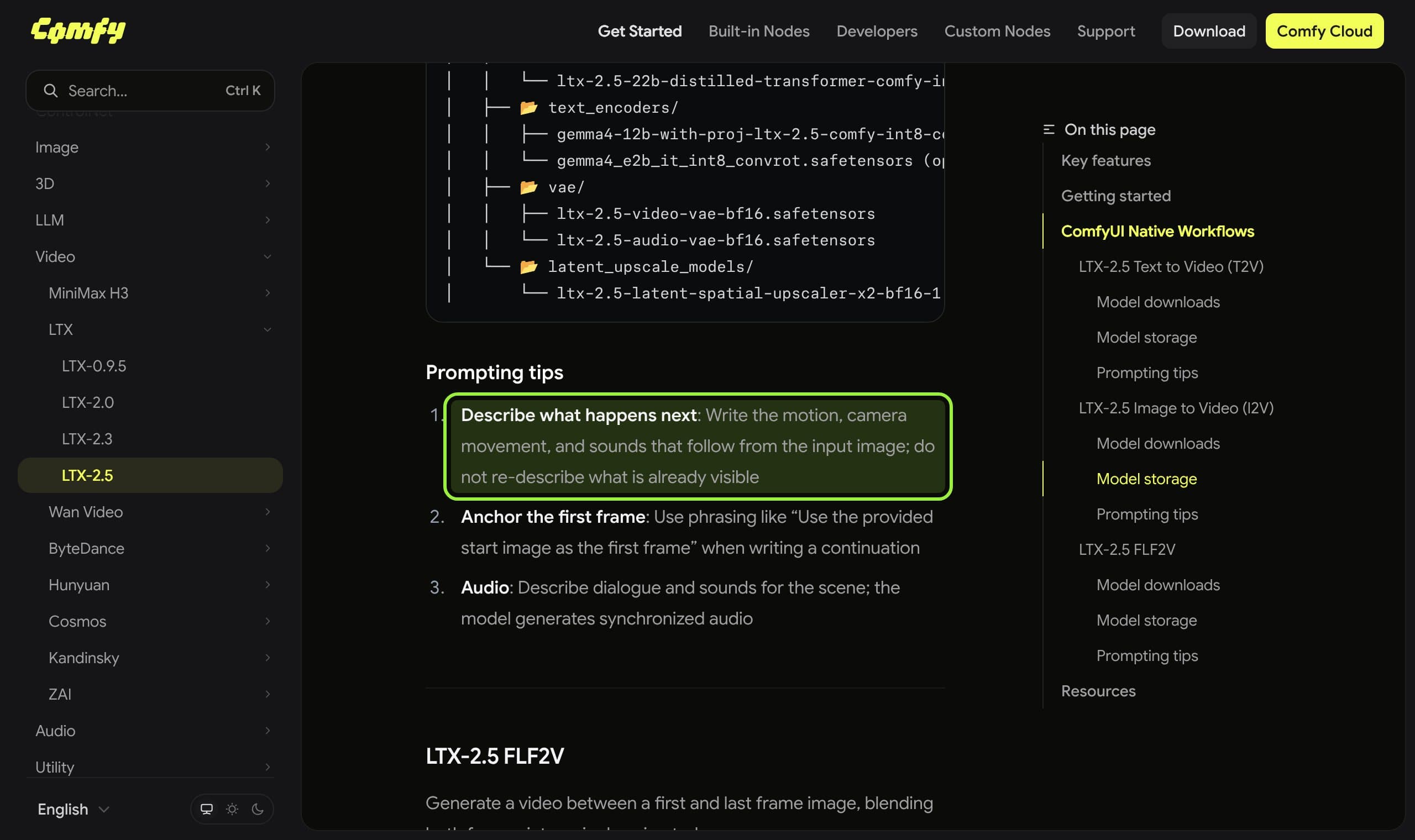
Comfy's first prompting tip is to write the motion, camera movement and sounds that follow from the input image and not to re-describe what is already visible. Its second is to anchor the frame with a phrase like 'Use the provided start image as the first frame'. Leave hair, outfit and face out of the prompt.
- 5
Leave the two strength settings at their official values
On the LTX-2.5 Img to Video node, image_strength is 0.70 and img_compression is 18 by default, and both are labelled as the official values. Change one at a time later, only after you have a baseline clip.
- 6
Render a short clip first
Set length to 49 frames for a two second test (the frame count has to be a multiple of 8 plus 1), compare frame 1, the middle and the last against the still, and only then go to 121 frames, which is 5 seconds at 24 fps.
- 7
Decide with the still next to the clip
If the face holds, queue the real reel. If it drifts at the same settings, move to the table below instead of re-rolling seeds for an hour.
A simplified map from the files and node inputs in Comfy's tutorial and the node page. Your template may add the spatial upscaler and extra nodes.
Why the prompt rule matters
It is tempting to paste the character's full description into the video prompt, because that is what worked for stills. For image to video it points the wrong way. The first frame already carries her face, and a second description of it is something the model has to reconcile. Comfy's tutorial says it directly, and we captured the passage rather than paraphrasing it.
| Prompt part | Re-describes the image (avoid) | Describes what happens next (use) |
|---|---|---|
| Subject | A woman with long dark hair and a green jacket | Use the provided start image as the first frame |
| Motion | She is beautiful and stands by the window | She turns her head toward the window and smiles slowly |
| Camera | A portrait photo, soft light | Slow push-in, shallow focus, the camera stays at eye level |
| Sound | Nothing | Soft room tone, a quiet breath, a short laugh |
The two settings that hold the first frame
The community node page for LTX-2.5 Img to Video lists the defaults this article uses. It is a community listing, not Comfy's own documentation, so treat it as the node's published description and check it against the node in your install.
LTX-2.5 Img to Video node defaults (node page, read 15 October 2026)
- mode
i2v(image to video) ort2v; image to video needs theimagesinput- width and height
- 1280 by 720 by default; stage 1 runs at half the size
- length
- 121 frames by default, on the 8k+1 grid
- frame_rate
- 24
- image_strength
- 0.70, 'how hard the first frame is held in stage 1'; the refine step re-holds at 1.0 and is locked
- img_compression
- 18, an H.264 CRF round trip on the input image; 0 turns it off
What the page does not say is what raising or lowering either number does to a face. So we do not claim it. The honest method is to keep both at the official values for the baseline clip, then change one at a time on the same seed and compare frame 1 with frame 60. If a change helps your character, you have a setting that works for her, not a rule for everyone.
What creators are reporting
What creators are saying
A tester's half-body portrait kept the woman's face in LTX 2.3 but came out visibly different in 2.5, and the older 2.3 face-ID LoRA changed it again. Another user suggested waiting for a 2.5 face-ID LoRA.
ComplaintHugging Face, LTX-2.5 discussion 30
Consistency is still not right at 1280 by 720 even with a FaceID LoRA. One reply says a character LoRA is the only option on this architecture; no one confirms it.
ComplaintHugging Face, LTX-2.5 discussion 14
Small faces in the generated video come out broken. The thread has no replies yet.
ComplaintHugging Face, LTX-2.5 discussion 71
Read the pattern, not the volume. These are three threads on a model with millions of downloads, and none has a maintainer answer or a confirmed fix. They tell you the failure is real for some people and that no one has published a settings recipe that cures it. They do not tell you your character will fail.
When the face still drifts
| What you see | Most likely reason | First move |
|---|---|---|
| She looks like a different person from frame 1 | Prompt re-describes her, or the model just drifts (threads 14 and 30) | Strip appearance words from the prompt, keep defaults, test again; if it persists, plan a character LoRA |
| Small or distant faces break | Low pixel count on the face (thread 71) | Fill the frame with her face; the model card's higher resolution pipeline uses 1088 by 1920 |
| A face ID LoRA made it worse | A LoRA made for LTX 2.3 used on 2.5 (thread 30) | Do not reuse a 2.3 LoRA on 2.5 and expect the same result |
| The still is cropped oddly | The node resizes and center-crops the first frame | Prepare the still at the output aspect ratio yourself |
The durable fix for a face that will not hold is training her into the model. Our character LoRA guide covers the data and the checks, and the consistent character guide covers the still-image side. If LTX-2.5 will not hold her at all, our Wan 2.2 reels guide is the quieter alternative, without sound in the clip, and the open video models ranking lays out the trade. The MiniMax H3 review covers the reference-based option.
Run it from the studio instead of the graph
If you would rather keep the character's approved stills in one place and ask for the clip in plain words, Musetta runs on your own ComfyUI and keeps each character's references, so the still you animate is the one you approved. It is one option; the graph above works without it. Our connect ComfyUI help page shows the setup.

The short version: update to ComfyUI 0.32.0 or newer, get access to the gated weights, write a prompt that only says what happens next, keep image_strength at 0.70 and img_compression at 18 for the baseline, render 49 frames first, and compare with the still. Check the linked threads again in a month, because the model and its LoRAs are changing.
Questions
- Does LTX-2.5 keep the same face in image to video?
- Sometimes. Three public threads on the model repository report identity drift, and none has a confirmed fix. Run one short test clip on your own still before you plan a series.
- What ComfyUI version does LTX-2.5 need?
- Comfy's LTX-2.5 page says to update ComfyUI to 0.32.0, or to use Comfy Cloud. Its tutorial adds that you open the template from the Template Library under Video.
- What are the right image_strength and img_compression values?
- The community node page lists 0.70 for image_strength and 18 for img_compression, and labels both as the official values. It does not say what changing them does, so test one change at a time on a fixed seed.
- Can I use LTX-2.5 for a monetized AI influencer account?
- The model card says commercial and production use is free under USD 10 million in annual revenue under the LTX-2.x Community License, with a paid agreement above that. Read the license itself before you rely on it.
- How many frames can I render?
- The frame count must be a multiple of 8 plus 1, for example 49 or 121 (model card). The node's default of 121 frames at 24 fps is about five seconds.
Sources
- 01LTX-2.5 on Comfy · Comfy, 2026-08
- 02LTX-2.5: ComfyUI workflow examples · Comfy docs
- 03Lightricks/LTX-2.5 model card · Lightricks, Hugging Face
- 04LTX-2.5 Img to Video node page · Comfy.icu (community)
- 05The character consistency in i2v is a disaster (discussion 30) · Hugging Face, 2026-08-13
- 06still 2.5 character consistency not perfect (discussion 14) · Hugging Face, 2026-08-12
- 07small face broken badly (discussion 71) · Hugging Face
Researched and written by the Musetta editorial desk with AI assistance, from the sources above. Numbers come from those sources; nothing is benchmarked by us unless the article says so. Spotted an error? Tell us on Discord and we fix it.